Synifg Studio keeps crashing on my macbook air. To be specific it crashes only when i start clicking on the waypoints and this is very frustrating. I was wondering if there is some different build of the software i should try out? ALSO I SEE SOMEONE WHO HAD THIS SIMILAR ISSUE Crashing about 20 times per hour
AND I SEE THAT YOU FIXED IT FOR SOMONE WITH A DIFFERENT SOFTWARE BUILD BUT THE LINK EXPIRED
Sadely this is the reason why software are updated: to solve bugs …
Also the 1.3.5 is from the dev builds, not even a “stable” one from the 1.4.x series.
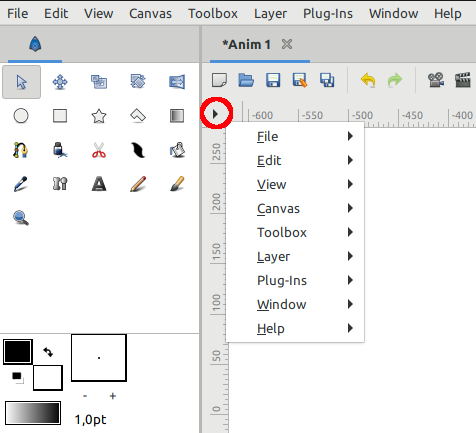
For the top bar, use arrow keys or open the menu from the black arrow here :
Is there a “maximum performance” gpu/cpu option on mac that can be set for Synfig? Also try disable autosave. Keep all windows docked to the main program frame and avoid using separate popup tool windows. This has helped me in other software like inkscape and opentoonz when they felt unstable. Maybe worth trying?
Also check theres no broken link to linked files in the synfig file like linked images, audio or papagayo files.
“5 minutes” is not instant crash.
I can only advice you to try with 1.4.5 and check what you are doing with Synfig.
Did you deactivate pre-rendering of frames?
Are you using images and/or videos?