hello everyone,
I’m Abdelrahman Emad and I have created this topic to discuss the Spine File Format Exporter project.
So far, I have added a new menu option titled Export to Spine Format within the Skeleton Layer. I have been exploring the Skeleton Layer implementation in Synfig to better understand its structure and behavior. and also I have studied the Spine JSON format and explored the Spine software itself
Currently, I am working on designing the mapping process between Synfig’s internal skeleton/animation structure and the Spine JSON file format.
I am asking: when an image is linked to a bone, where does Synfig handle this?
are Synfig waypoints and keyframes converted into Spine keyframes during export @ice0@rodolforg@mohamed.Adhamc
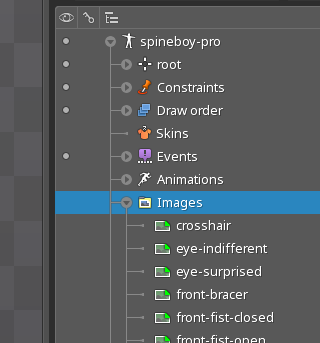
and also in the Spine file structure, the skeleton part references the path to an images folder, since Spine expects all related images to be stored inside a dedicated directory.
like this image in spine software
When exporting from Synfig to the Spine format, should the exporter automatically create an images folder and copy all project images into it based on a user-defined path? Or is there a recommended approach for handling image paths and asset organization during the export process?
In a general way, when you do an export, it should be possible for anyone to access all the needed data without to have access to the original.
It is like a backup.
If you want to send your export to a friend, he doesn’t have access to your machine nor specific paths.
Normally, you should use a dedicated directory for the whole animation and possibly an asset subfolder, and use only relative paths.
Maybe even to do a zip to distribute it.
Now there are the specifications but don’t always rely blindly on them.
Build your own assets for test an check whether they open as expected during the import inside Spine.
Everything should be portable, independant, modular, to keep it organized.
in the project we can export the Skeleton layer or Skeleton Deformation layer
in the spine we have only one skeleton
if we have multiple skeletons in the Synfig project we export them as independent skeletons ?
Spine does both at the same time, Skeleton (Rigging) + Mesh deformation (Mesh + Weight), there should be a way to do it.
Anyway, I don’t think that we could do a perfect export, Spine and Synfig don’t play on the same ground.
IK constraints: sadly not yet, but there is a user (zainal) trying to implement it (in a limited version)
transform contraints: yes, it is possible (but not that easy). User should convert the Origin/Rotation/Scale using Grey converter and (if wanted) Disabling Animation. So s/he couldn’t change its value (via GUI)
Yes. Fortunately, Synfig is pretty flexible. Sadly, Synfig is pretty flexible.
We can change the parent of skeleton deformation layer to the main skeleton layer and also two normal skeletons can be combined by setting one skeleton as the parent of the other.
During export to Spine, all skeletons that are linked together will be combined and exported as a single skeleton Should i take this approach?
I am approaching converting interpolation from Synfig to Spine format and I’m a bit confused about the correct mapping.
in the spine the linear will be omitted , and constant will be"stepped"
for TCP , Clamped and ease in/ out In Spine, the interpolation is defined using 4 values (cx1, cy1, cx2, cy2) in range [0,1] I want to know what is the correct way or formula to convert these interpolations.
the time and value can be more than 1 and also can negative how map it to [0 1]
I tried searching but couldn’t find a clear or correct approach for this conversion