I have finished this video…but a friend said there was a problem with it( it’s shaky she said ) …Can anyone tell me if it’s true and help me identify the problem?
I don’t know if this is what your friend saw (I think so), but I just see one problem with the pendulum of the clock. The rotation point is incorrect.
I’ll show with an example that I have made:
The first is as you made it. The second, is a most natural for viewers. Look at every clock and you’ll see that the first is “strange”, but the second is “real” even it is a bad clock draw. : )
When you make an animation, you can break some rules, but others must be preserved, because the brain of the viewer waits that all works… even in cartoons.
Thank you for your compliment as well as for your comment…It is very accurate…You’re right…the rotation point is incorrect.
It’s about the shakiness of the frames that I’m worried …
Can you please compare the two videos below: They are the same …(first one edited by me…the second one was edited by a friend)
Which one looks normal (not faulty) ? and runs smoothly ?
Uhm… I can see any difference. Both seem the same (smoothness) to me.
Why not your friend tell you exactly what he did or what he saw?
The unique difference I can see is that the second video use a “H.264 Baseline Profile level 3.0” code and the first video use “H.264 High Profile level 3.1”. But… well… I don’t know if it make any difference.
Hi Leila,
Awesome work as always! Though I would add a bit more explosions and… wait a second… what am I talking about?
About the problem. The first animation looks shaky, especially the camera movement, it’s ragged. The second one is better, but still suffering the same problem.
I believe it’s low framerate and video bitrate that causes ragged movement. Your animation has 10 FPS and ~900 Kb/s and if I understand something, it has to be at least 24 FPS with 2500 Kb/s video bitrate (because of high resolution - 1280x720).
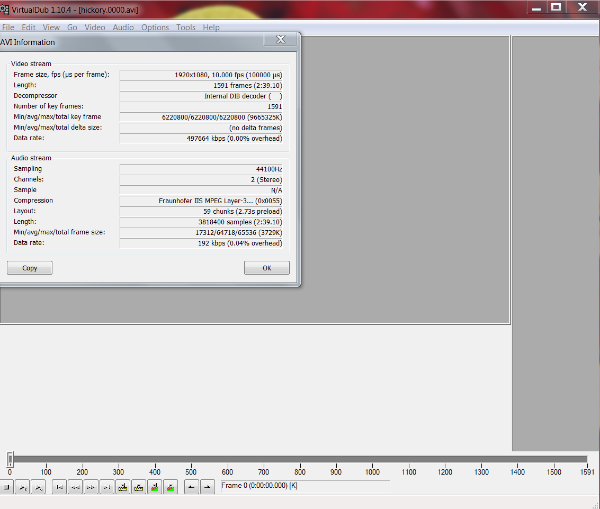
My video player (SMPlayer) shows me that your animation is only 10 FPS, so we need to determine who actually screwed your animation. Do you still have the original file (rendered animation, not Synfig file) before editing it in VirtualDub? If so, please open it in VirtualDub, then take a screenshot of “File->File Information…” window and post here.
Also, did you use “VirtualDub->File->Export->Image sequence” to save your animation?
Please, Leila, read posts more carefully. I asked “did you use VirtualDub->File->Export->Image sequence to save your animation?” and that was important question to understand your steps. And now I have to assume what you were doing by myself.
So, I guess, in Synfig you rendered your animation using png target, then you opened image sequence in VirtualDub to edit rendered animation (e.g. to add sound), and lastly you saved it to avi. Is this assumption correct? If so, then I found a solution, just need to clarify it first.
Sorry that answering back take me so much time. With my job, I only have some free time on mornings before going to work…
Well, the “solution” is easy then:
Open VirtualDub.
Go to “Options → Preferences → Images”.
You’ll see “Default frame rate” setting, its value is 10.0000 (10 FPS).
Change it to 30, click “Save” and “OK” buttons.
Restart VirtualDub.
Now you can edit your animation in VirtualDub again. The resulting animation will be much smoother. After render, you can check “File->File Information…” in VirtulDub, it should show you 30 FPS.
About time… Your animation is 53 seconds long with 30 FPS. When VirtualDub was set to 10 FPS it caused your animation to slow down, because the total amount of frames is 1590(30 FPS*53 seconds) and VirtualDub was treating it like 158 seconds (1590 frames/10 FPS). So your clip was running slower and quality of the video was reduced.
To change the speed of animation without lowering quality of video you have to adjust your animation in Synfig and re-render the whole project. So, open Synfig and load your project, then open “File → Panels → Keyframes”. You will see all of keyframes and their length. Try manually adjusting all keyframes length. Unfortunately, I don’t know if there’s a better method…
Wow, I feel like I brought up a lot more work for you… Sorry for that
Thank you so much for having taken the time to reply despite your busy Schedule. I’m grateful.
You helped me diagnose the issue and that is the most important thing. I will work on the animation on Synfig (it will be hard work but it will hopefully be worth it)
 …Can anyone tell me if it’s true and help me identify the problem?
 as well as for your comment…It is very accurate…You’re right…the rotation point is incorrect.