So, I have been playing around with Synfig in the past days, and first of all thanks to the many tutorial by @Khemardi and the amazing Controller plugin by @veermetri05 with which I was able to replicate a clip from my movie. The original clip was made in 2023, so there is of course progression from me as an animator, but it was more for myself to see, if I run into a wall trying to work in my old workflow I was using over the last couple of years. I also did a redesign of the character, which was on purpose, to make it look a bit slicker, but that’s up to taste.
Here is the side-by-side comparison:
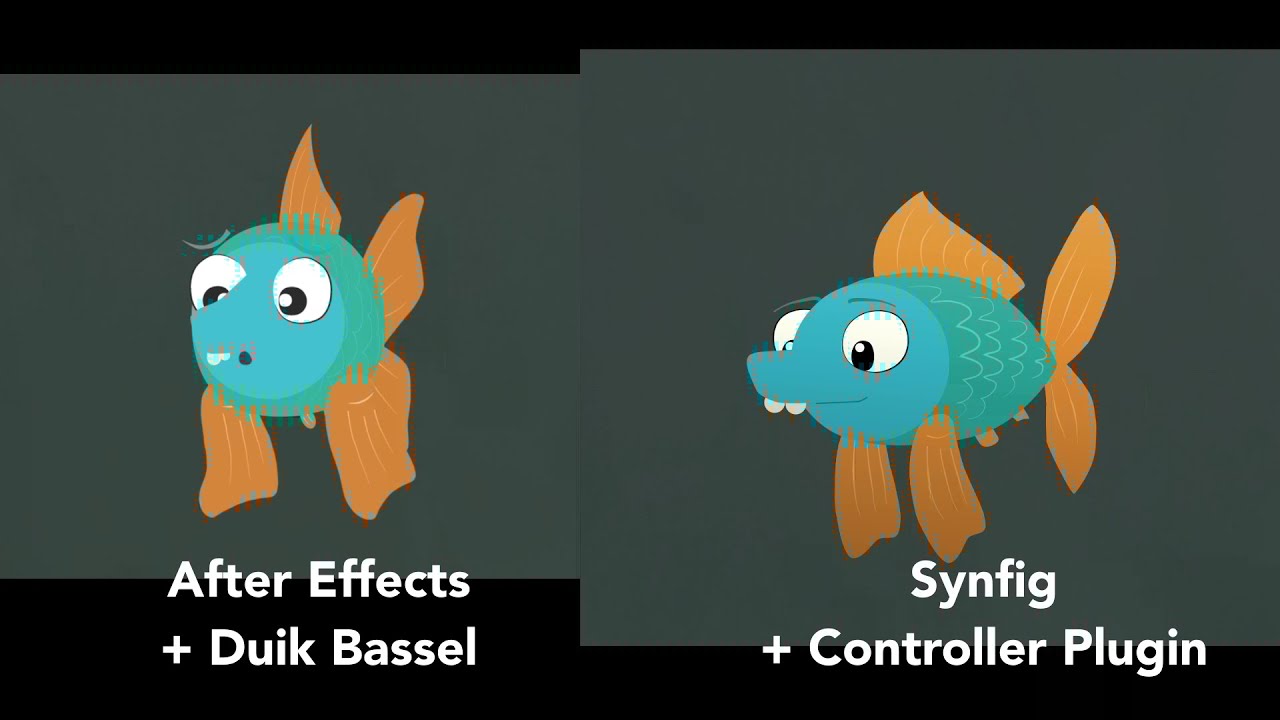
Here are my findings:
- SPEED: Synfig is a TON faster than After Effects. It’s amazing that such expensive software is so damn slow. Synfig is lean and stupid fast. The preview in After Effects always needed about thrice the duration of the clip before showing the result. Synfig is more or less instant on my machine (14900K processor), even with the plugins.
- CONTROLLER PLUGIN: The switch from the Duik Bassel sliders to Synfig is very seamless with the Controller Plugin by @veermetri05 . The 2-way slider works different, but not in a bad way. It was less headache with the Controller Plugin than with the Duik way. But Duik has more fine-tuning.
I was wondering, if I could control different sliders with one bone, since I need to have different sliders for the two eye-lids. Didn’t work with a simple bone, maybe someone knows a solution for that. - IK: I am currently playing with @zainal IK plugin, which works great, but I couldn’t use it in my test, since it’s not usable for the deformation skeleton at the moment. For a normal skeleton I was impressed for how intuitive it works and I will definitely try it out more with a different puppet. For me, IK is a must-have feature for an animation program, so it’s great to see there is a plugin.
- PAPAGAYO: I used Papagayo for the lip syncing. Originally, I did all the lipsyncing manually using a slider in After Effects. This was such a pain. Papagayo is much faster, but I still have to find a way to combine the Papagayo stuff with other mouth shapes. Papagayo is sadly very unstable in Linux Mint. Constantly crashing. I don’t know if the Linux version is actively maintained or not, since there hasn’t been a new version for quite some time. Would be great to see improvement there, but it’s great how fast and easy it works. Gamechanger for me!
- EASING: The easing is rather limited. I wish there would be a way to change the easing type for a bunch of waypoints at once, so I don’t have to clickedy-click dozens of times. I’m still not getting warm with the keyframe-waypoint system. But I guess I will find my way into that too. The easing is very nice, but a spline editor for values would be an amazing addition.
- SCALING: I love that in Synfig, anything is scalable. I work in my tiny canvas, but I can output any resolution and framerate after the fact. After Effects has a very strict way of doing things, and things get pixelated rather quickly. My character suffered from this too, but that was a problem of Duik rastering everything. In Synfig it feels like a more natural integration without anything falling apart because of the scaling.
All in all, I had absolutely no trouble building the puppet and animating a cut-out animation with all the bells and whistles. Synfig is much faster to work with and the Controller plugin is great for cut-out animation. Also the IK plugins are great, but I have to test them out more. It’s amazing what this piece of software can do and I will definitely switch over to Synfig. It’s a steep learning curve at the beginning, but thanks to the many great tutorials it is not that hard.