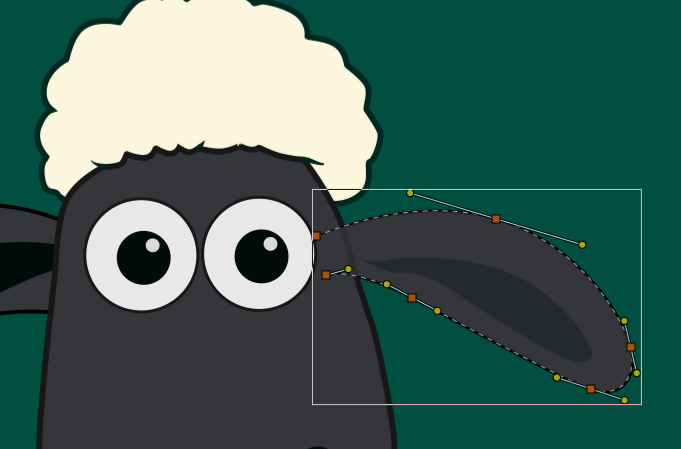
Delaying the visual update until the interaction is finished makes it harder to understand the effect of the action. This isn’t limited to curve editing—it also applies to most of the tools in the application, such as scaling the image, moving bones, transformations, and more.
I think keeping interactions responsive and providing continuous visual feedback leads to a much smoother editing experience across the entire application, not just for curve editing.
Exactly. Unfortunately, at the moment it only applies to curve editing. Hopefully the same idea can be extended to other editing tools in the future.
When I first started using Synfig, one of the things that surprised me was the delayed visual feedback during editing. It felt quite different from other animation applications such as Moho, Friction (Enve), OpenToonz, and Adobe Animate. Because of that, I initially drifted away from Synfig.
However, I eventually came back because I discovered many interesting ideas and features that make Synfig unique. I think improvements like this could make the editing experience even more enjoyable for both new and existing users.
Oh, and I also managed to customize the Duckmatic handles. Instead of all of them being circles, I changed them to different shapes such as squares, plus signs, and kite shapes. I also adjusted their sizes, so they now look much more like the handles in Inkscape.
I find this much more comfortable and intuitive when editing.
Don’t forget that Synfig started to be developed as an internal tool like a patchwork, for a little studio in 2002, based on opensource technologies available at that time (GTK ecosystem).
And since it as been open-sourced,there are only a few devs on it.
The other tools quoted are either commercial with a quite huge team, or in the case of Friction/Enve, it has benefited from newer technos in Qt.
Note that Maurycy Liebner started enve because he was not satisfied with the experience he had with other software, including Synfig (2016) as a starter