how do i add frames? not keyframes frames to animate
If you don’t know how to animate in Synfig, please read the manual in wiki.
You got to canvas. It’s on the top where the menu bar is. select properties, then select time. At the bottom right hand side you will find a little box saying frames. erase the frame number that is there and put in the number of frames you want. I hope this helps everyone. I spent a month trying to figure this out especially the F8 did work for me.
You can change the ending time by typing it in this toolbar field:
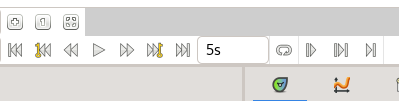
Change 5s to whatever you want. Maybe 5s 3f to add just three frame more. Or to 30f if your animation must last 30 frames only, etc.