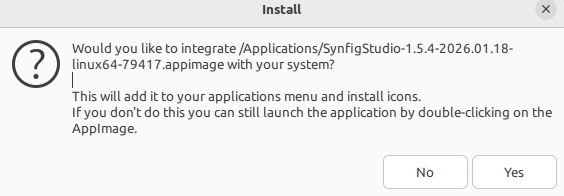
I was working with Synfig normally in Linux Mint 22.2 until yesterday.
I needed to reformat and install Linux Mint 22.3. I installed my typical AppImages: Krita, Inkscape, and appimagelauncher: GitHub - TheAssassin/AppImageLauncher: Helper application for Linux distributions serving as a kind of "entry point" for running and integrating AppImages · GitHub (it creates the menu entry and icon for all appimages).
I found that the Synfig Appimage cannot start while the appimagelauncher (DEB version) is installed. Running the Synfig appimage from the terminal reveals: “Can’t open /tmp/.mount_NNNN/…”
I uninstalled it and Synfig ran fine again. It created its font cache in first run and started.
I did some experiments with appimagelauncher Appimage version and it was a little better. But I stop my story here…
Is appimagelauncher known to interfere with Synfig? Is there a way to make them work together smoothly. If not, I would be OK with just leaving appimagelauncher.
In one word, yes #3664
Synfig can be either installed or mounted on-the-fly.
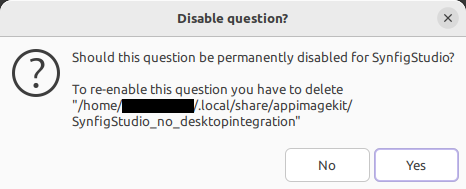
If you don’t want the integration and keep track of this choice, it creates a file
~/.local/share/appimagekit/SynfigStudio_no_desktopintegration
If you accepted to install it,
~/.local/share/applications/appimagekit-synfigstudio.desktop (user mode) is created
(or /usr/share/applications/appimagekit-synfigstudio.desktop if --mode system)
which contains a Exec command pointing at the .appimage
AppImageLauncher does a bit the same but orchestrate everything staying in memory.
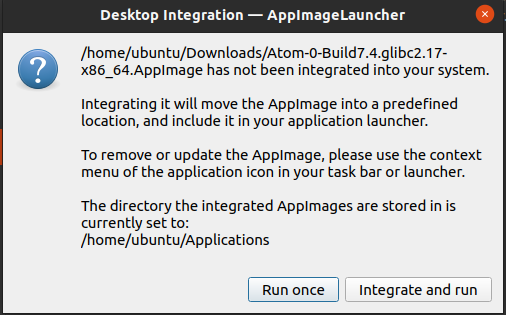
You should try to “Integrate and run” in AppImageLauncher, and to refuse the install (no) from the Synfig prompt, and also disable the question permanentely (yes)
Note that the official .appimage is still V1 format, permissions on /tmp/ can originate from here
Doing some more research, it seems that there are interferences between appimagelauncher and V1 versions.
V1 contains “desktopintegration”, a script that is used to display the messagebox you have at start of Synfig.
In the process of conversion from V1 to V2, it is advised to remove the AppRun from V1 which will be automatically replaced by the one of V2 and to remove desktopintegration in order to let “an external tool” like appimagelauncher to do job. (or to create manually a .desktop and place it where needed).
Not a big deal but as I have now the information, better to share it ^^
Thank you. 
Right now, I disabled appimagelauncher. I am only starting Synfig by double clicking the AppImage directly in the “File Explorer”… and double clicking a sifz file opens Synfig, at it should