Hello,
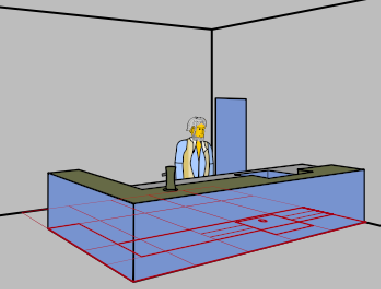
Meet Bart, my friendly bartender, standing behind his counter.
Kneipe2d.sifz (203,8 KB)
Bart is tasked with taking two steins from below the counter and placing them on top of it.
Everything in this animation is happening in “Main layer”. The “Background” layer is static, and the “Construction” layer will be hidden when the animation is rendered.
- So Barts starts out on a layer that is placed below the counter layers (Keyframe 0f).
- Bart is on layer 9, the counter is on layers 0, 1, and 8,
- (He can already have his steins near his hands because they won’t show, being covered by the counter layers)
- Bart lowers himself and grabs his steins (keyframes to 42f)
- and ends upright in keyframe 66f.
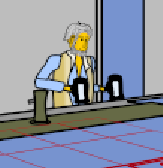
Now, at this point in the animation, Bart is stumped.
- In order to place his steins onto the counter, the steins must be in front of the counter. But he and his steins are behind the counter. Each stein is even in a group inside a group that is in the Bart group! How do the steins “jump” out of the group structure at this point in the animation and onto a layer that can be placed in front of the counter layers?
- Bart’s left (back) arm poses an even worse conundrum.
- On the one hand, it must be behind Bart’s body (because the body covers the arm) which is behind the counter (because the counter covers the body).
- But on the other hand, the left arm is going to reach over the counter top in order to place its stein, so it must get a placement in front of the counter, too!
- How can a layer be both behind another layer and in front of it at the same time?

So Bart doesn’t know how to continue this animation.
Bonus question: Later in the animation, Bart will probably have to walk a few steps to the right. This will make him shorter for perspective reasons (cf. the floor plan in red that is superimposed onto the animation).
This isn’t a problem when Bart is “in one piece” on one layer: He will simply reduce his Scale.
But if Bart has to be split up, i.e., his right arm group is on one layer (holding its stein over the counter) and the rest of Bart is on another layer (behind the counter), then I envision that this will become ugly: During Bart’s walk, I need to keep Bart’s arm attached to Bart’s body in each frame – pixel perfect –, and both layers must reduce Scale in sync.
How do I keep a structure aligned where part of the structure is on one layer and the other part on another layer, but both layers can’t be grouped together?
