Hello! I’m Brendan and have been looking into the 2D Free-Form Deform project.
So far, I have been looking through how the skeleton deformation layer works in Synfig, and I found and read the original FFD paper that explains the implementation in 3D:
It can be implemented in 2D by just ignoring the third parameter, and the paper also outlines how to define control points. It seems to be a good starting point, though the exact math may depend on how control points are defined.
Looking at layer_skeletondeformation.cpp, it seems like to implement FFD, I would need to do something very similar, but replacing the bone-influence of grid points with the deformation.
A question I still have is about the control points. Should the control points be some point on one of the grid intersections that you can set to be a control point? Or should you be able to set any position to be a control point?
I’ll be starting to look through how duckmatic works when I have some more free time over the next week.
hi @rodolforg, I’m also researching this idea in the idealist.
There is one question that I want to ask: Do you think this system should be able to work at the same time with skeleton animation? (o ~ O)
Such functionality could make the animation much more flexible and give artists more control.
Thank you for reading this :3
I assume that it should, and based on how the layer system works (or at least how I think it works), it should happen automatically. If you have a Skeleton Deformation layer that renders and deforms the layers below it, the FFD layer placed above it will then perform the deformation on its output.
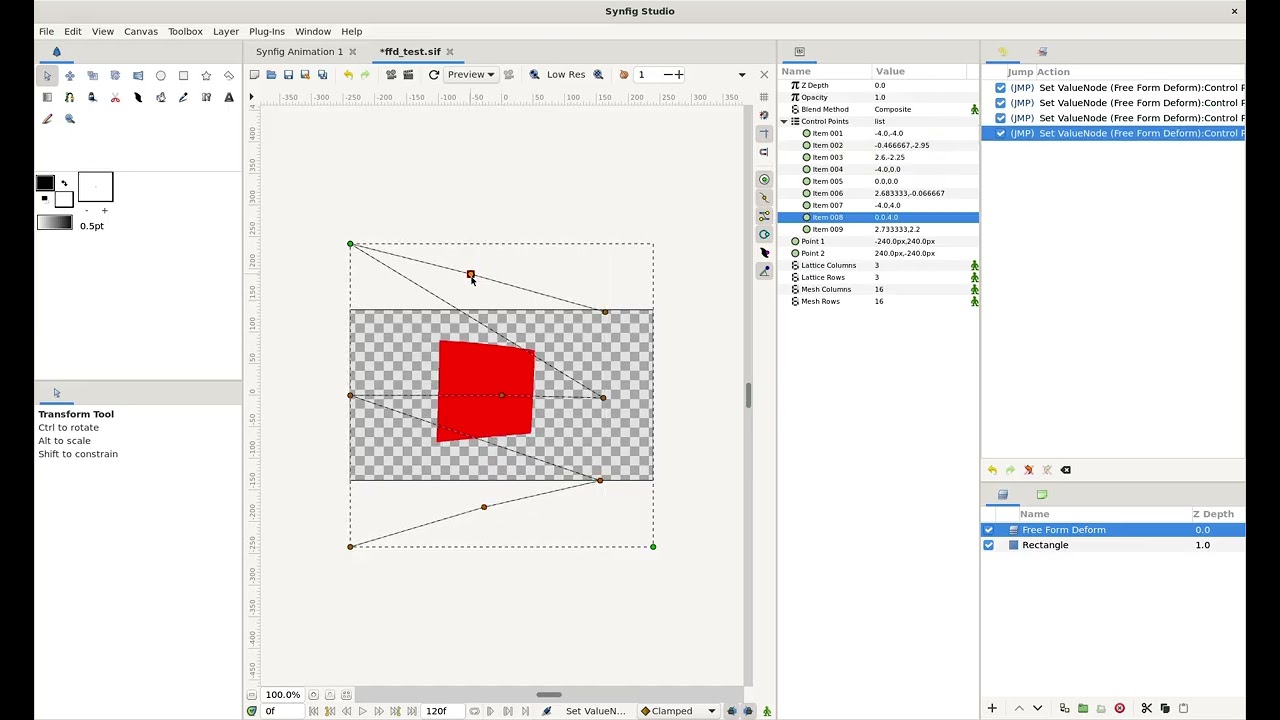
I have made a draft implementation of the FFD layer. I haven’t implemented any system for actually creating the layer, and I currently don’t like how the control points look. I am also sure that there are other issues with how it interacts with other layers.
I currently just have the change on my fork. Here are the current changes:
And @SaFiNguyen the two points define the bounds of the layer. Right now, if you move anything below it will warp to maintain the initial scale. I don’t think this is the best behavior; it would probably be better if moving it around appeared not to affect the layer below, until you actually deform it. There is much to still be done!
Thank you for providing the CPP file. I’ve tried it, and it still requires some additional setup in the POFILES.in file. Perhaps you might have missed that part.
I hope you’ll be able to create something like this (https://youtu.be/9cp31bAgNeo?si=MREe6TniAbbTsOTQ)in the future. I need points that can be controlled later using “value at time,” so it can be used to build something like a smartbone-based mesh.