# \[Workaround\] MacOs - My menu disappeared
**URL:** https://forums.synfig.org/t/workaround-macos-my-menu-disappeared/14011
**Category:** Synfig related help
**Tags:** macosx, menu, menubar, disappeared, workaround
**Created:** [April 29, 2023, 9:56pm UTC](https://forums.synfig.org/t/workaround-macos-my-menu-disappeared/14011 "2023-04-29T21:56:11Z")
**Posts on this page:** 14
**Page:** 1
### Author:  [@Chozenfew](https://forums.synfig.org/u/Chozenfew)
#### Post date: [April 29, 2023, 9:56pm UTC](https://forums.synfig.org/t/workaround-macos-my-menu-disappeared/14011/1 "2023-04-29T21:56:11Z")
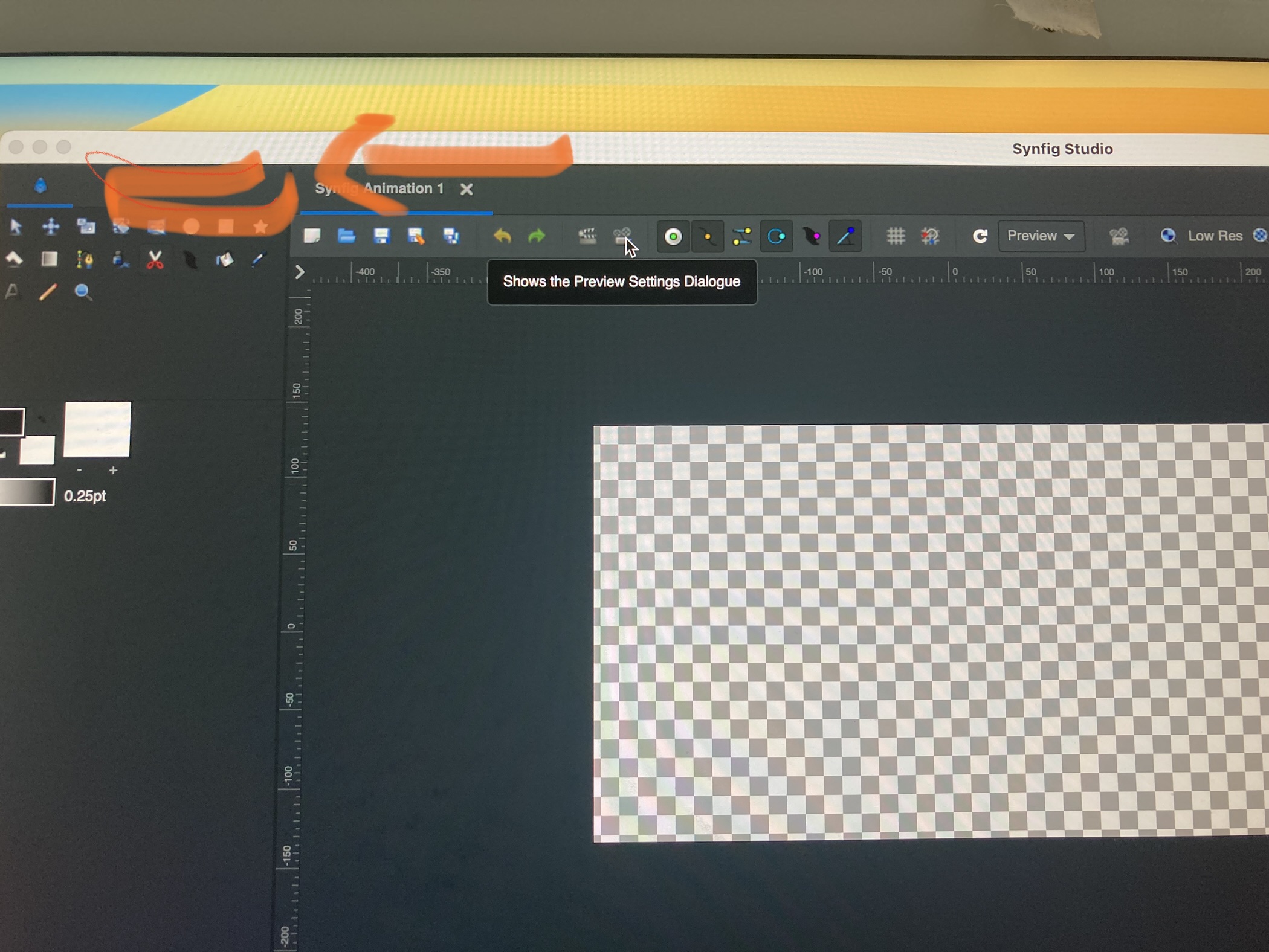
I just started using Synfig through learning tutorials. I have a Mac OS…My toolbar that has “Menu, preferences etc wasn’t working at all…it wouldn’t even highlight when I would click to select it…then it disappeared. Help please
!
---
### Author:  [@mohamed.Adhamc](https://forums.synfig.org/u/mohamed.Adhamc)
#### Post date: [April 29, 2023, 10:35pm UTC](https://forums.synfig.org/t/workaround-macos-my-menu-disappeared/14011/2 "2023-04-29T22:35:37Z")
Hello there !
In Synfig it is possible to hide the menu bar along many other things. This helps to free up space if you need it. To get it to show back you can right click anywhere in the canvas then click on view then show menu-bar. Good luck in your animation journey : ).
---
### Author:  [@BobSynfig](https://forums.synfig.org/u/BobSynfig)
#### Post date: [April 30, 2023, 6:49am UTC](https://forums.synfig.org/t/workaround-macos-my-menu-disappeared/14011/3 "2023-04-30T06:49:14Z")
Both your problems are known and have a workaround, please use the search function 🙂
It is MacOs specific sadely.
---
### Author:  [@pablogil](https://forums.synfig.org/u/pablogil)
#### Post date: [May 5, 2023, 9:59am UTC](https://forums.synfig.org/t/workaround-macos-my-menu-disappeared/14011/4 "2023-05-05T09:59:09Z")
Well, I don’t know how it behaves under Linux and Windows but under macOS it doesn’t work this way: the only place to get the menu dropdown is in the following button (squared in red):
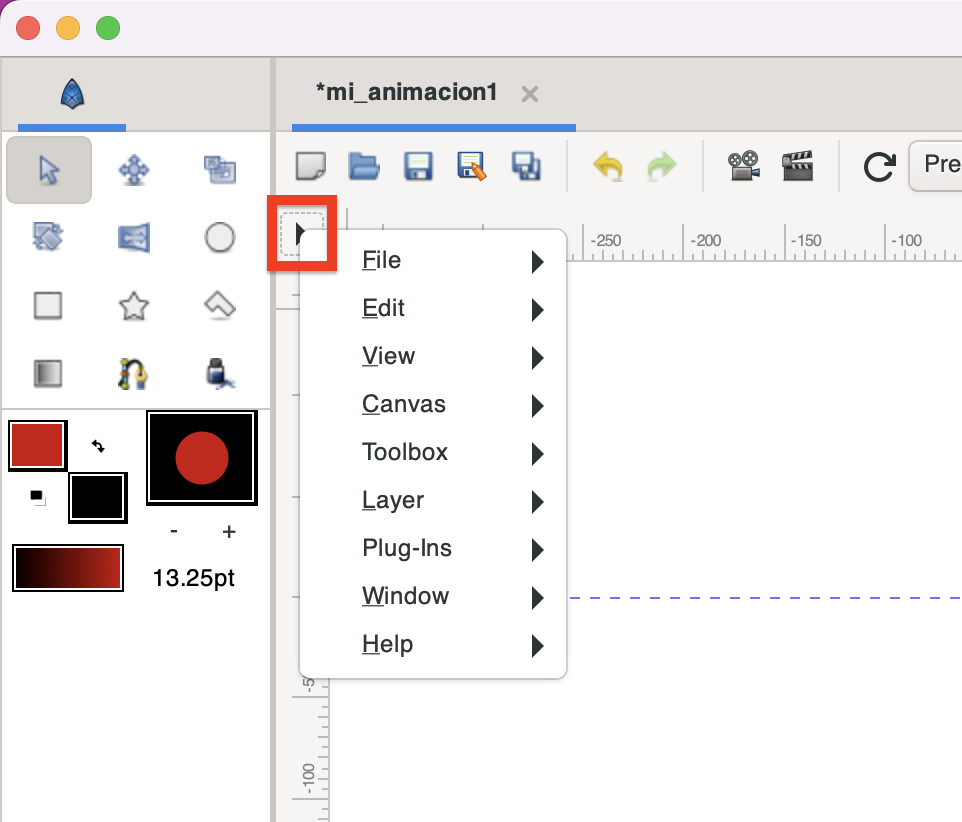
From there you can go to View → Show menubar and you are done 😄
Cheers
---
### Author:  [@rodolforg](https://forums.synfig.org/u/rodolforg)
#### Post date: [May 5, 2023, 11:26am UTC](https://forums.synfig.org/t/workaround-macos-my-menu-disappeared/14011/5 "2023-05-05T11:26:14Z")
In your case indeed.
You use Solid Color layer.
Hmm… We were removing this Arrow menu, but it looks like we can’t XD
---
### Author:  [@pablogil](https://forums.synfig.org/u/pablogil)
#### Post date: [May 5, 2023, 11:51am UTC](https://forums.synfig.org/t/workaround-macos-my-menu-disappeared/14011/6 "2023-05-05T11:51:23Z")
Well, you could remove the arrow if you add the whole menubar entries in all “right click” dropdowns around the app (or just when in the canvas as you said it before…)
---
### Author:  [@mohamed.Adhamc](https://forums.synfig.org/u/mohamed.Adhamc)
#### Post date: [May 5, 2023, 5:28pm UTC](https://forums.synfig.org/t/workaround-macos-my-menu-disappeared/14011/7 "2023-05-05T17:28:00Z")
Hmm I see, I didn’t know that right-clicking doesn’t work on mac. I’ll try to investigate a little on why that’s happening if noone does by the time I do.
A first guess is that maybe it has to do with the windowing system ?! I’m saying this because on my ubuntu it gives all sorts of errors whenever any menu appears. The errors are usually something about the window not being attached to a parent or something xD I never paid much attention to them. But I believe these errors only started happening when I moved to Ubuntu and not on mint or windows.
---
### Author:  [@rodolforg](https://forums.synfig.org/u/rodolforg)
#### Post date: [May 6, 2023, 1:03am UTC](https://forums.synfig.org/t/workaround-macos-my-menu-disappeared/14011/8 "2023-05-06T01:03:30Z")
It is the solid color layer as white background
---
### Author:  [@mohamed.Adhamc](https://forums.synfig.org/u/mohamed.Adhamc)
#### Post date: [May 6, 2023, 10:43am UTC](https://forums.synfig.org/t/workaround-macos-my-menu-disappeared/14011/9 "2023-05-06T10:43:58Z")
Oh yes at first I though the menus weren’t appearing at all in mac. I just tested and clicking anywhere in the canvas (outside the actual working area even) seem to have the same behavior as selecting the background layer. This is a bit confusing honestly. I can’t even seem to find out how big this background layer is, shouldn’t it only be as big as the workarea ?
---
### Author:  [@rodolforg](https://forums.synfig.org/u/rodolforg)
#### Post date: [May 6, 2023, 10:46am UTC](https://forums.synfig.org/t/workaround-macos-my-menu-disappeared/14011/10 "2023-05-06T10:46:52Z")
The SolidColor layer has infinity size.
Stuff outside the canvas view is clickable. It is useful sometimes.
---
### Author:  [@mohamed.Adhamc](https://forums.synfig.org/u/mohamed.Adhamc)
#### Post date: [May 6, 2023, 10:49am UTC](https://forums.synfig.org/t/workaround-macos-my-menu-disappeared/14011/11 "2023-05-06T10:49:47Z")
Oh yes I realize that layers outside are still clickable but doesn’t this infinity size cause some problems ? I mean at the very least it makes the top left arrow button necessary to restore menus.
Also I think it’s a bit counter-intuitive that clicking outside the background has the same behavior as clicking on the background.I think maybe this was done to make sure the background never moves.
---
### Author:  [@rodolforg](https://forums.synfig.org/u/rodolforg)
#### Post date: [May 6, 2023, 10:59am UTC](https://forums.synfig.org/t/workaround-macos-my-menu-disappeared/14011/12 "2023-05-06T10:59:15Z")
Other layers have infinity size too, like the gradient ones.
Well, I don’t know why hide main menu bar is useful lol.
Anyway, LibreOffice has an option of UI layout that hides its main menu too.

But then the toolbar has a “Menu” option menu in its right side, that has a toggle item that let user restore main menu bar to visible.
---
### Author:  [@mohamed.Adhamc](https://forums.synfig.org/u/mohamed.Adhamc)
#### Post date: [May 6, 2023, 11:49am UTC](https://forums.synfig.org/t/workaround-macos-my-menu-disappeared/14011/13 "2023-05-06T11:49:04Z")
> [@rodolforg](#):
>
> Well, I don’t know why hide main menu bar is useful lol.
Theoretically its good for allowing more screen size for those with smaller screens or maybe those who want to minimize distraction xd. But practically I’m also actually interested to know how often its used
> Other layers have infinity size too, like the gradient ones.
I see, fair point. I guess there is not much to be done then, maybe we could also add something like LibreOffice or… just leave everything as is xD. Another thing that I also just thought of now, maybe an alternative could also be to style the arrow menu button thing diffrently when the menu disappears to draw attention to it. I think it would be quite simple to do with css styling already set up.
---
### Author:  [@BobSynfig](https://forums.synfig.org/u/BobSynfig)
#### Post date: [May 6, 2023, 1:19pm UTC](https://forums.synfig.org/t/workaround-macos-my-menu-disappeared/14011/14 "2023-05-06T13:19:22Z")
> [@mohamed.Adhamc](#):
>
> I didn’t know that right-clicking doesn’t work on mac.
It should work with Ctrl-Click or with proper settings for the trackpad (activate Secondary Click if needed)