# Unable to load file , can't find linked file

**URL:** https://forums.synfig.org/t/unable-to-load-file-cant-find-linked-file/14179
**Category:** Synfig related help
**Created:** [June 24, 2023, 6:28pm UTC](https://forums.synfig.org/t/unable-to-load-file-cant-find-linked-file/14179 "2023-06-24T18:28:52Z")
**Posts on this page:** 8
**Page:** 1

<div class="post-metadata">

### Author: ![mythieval](https://forums.synfig.org/letter_avatar_proxy/v4/letter/m/f4b2a3/32.png) [@mythieval](https://forums.synfig.org/u/mythieval)
#### Post date: [June 24, 2023, 6:28pm UTC](https://forums.synfig.org/t/unable-to-load-file-cant-find-linked-file/14179/1 "2023-06-24T18:28:52Z")

</div>

Hi guys I have seen other similar posts to this problem like this ([Can't find linked file](https://forums.synfig.org/t/cant-find-linked-file/4081)) and this ([Suddenly unable to load file, "can't find linked file"](https://forums.synfig.org/t/suddenly-unable-to-load-file-cant-find-linked-file/11478))  
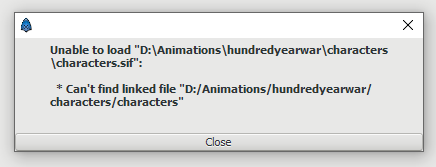
the error I’m getting  
 ![image](https://forums.synfig.org/uploads/default/original/2X/0/06d075e158c841af8dfd065e58ebf2984febd9eb.png)

I tried the steps but i could not really resolve it on my own. I tried editing the file on a file editor up to this point, i also tried changing it to characters.sif in the file editor but it came up with a different error.

---

<div class="post-metadata">

### Author: ![Svarov](https://forums.synfig.org/user_avatar/forums.synfig.org/svarov/32/8167_2.png) [@Svarov](https://forums.synfig.org/u/Svarov)
#### Post date: [June 25, 2023, 10:08am UTC](https://forums.synfig.org/t/unable-to-load-file-cant-find-linked-file/14179/2 "2023-06-25T10:08:10Z")

</div>

So you have the uncompressed project file? Awesome, we’ll go from there.

First, create a simple new Synfig project. Just draw a circle in there and save it in the same folder where your main project is (the file that doesn’t load) as ‘1.sif’. Now open the problem file in your text editor, perform a search for “characters.sif” and replace all occurrences with “1.sif”. Save the file and try to open it in Synfig.

If everything’s fine, your work will have circles instead of characters and from there you just delete them and re-import you characters back.

---

<div class="post-metadata">

### Author: ![mythieval](https://forums.synfig.org/letter_avatar_proxy/v4/letter/m/f4b2a3/32.png) [@mythieval](https://forums.synfig.org/u/mythieval)
#### Post date: [June 29, 2023, 3:40pm UTC](https://forums.synfig.org/t/unable-to-load-file-cant-find-linked-file/14179/3 "2023-06-29T15:40:45Z")

</div>

Hi, sorry what do you mean by reimport the characters back? Also how does this error usually occur? I would like to avoid it in the future. Thanks !

---

<div class="post-metadata">

### Author: ![mythieval](https://forums.synfig.org/letter_avatar_proxy/v4/letter/m/f4b2a3/32.png) [@mythieval](https://forums.synfig.org/u/mythieval)
#### Post date: [June 29, 2023, 3:54pm UTC](https://forums.synfig.org/t/unable-to-load-file-cant-find-linked-file/14179/4 "2023-06-29T15:54:03Z")

</div>

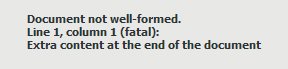
sorry if im being a bit spammy erm after i edited the path in a file editor I’m getting a new error  
 ![image](https://forums.synfig.org/uploads/default/original/2X/0/0f87e5f08ca2bf775703d57ba73608b4d9dac5b1.png)

---

<div class="post-metadata">

### Author: ![Svarov](https://forums.synfig.org/user_avatar/forums.synfig.org/svarov/32/8167_2.png) [@Svarov](https://forums.synfig.org/u/Svarov)
#### Post date: [June 30, 2023, 4:22am UTC](https://forums.synfig.org/t/unable-to-load-file-cant-find-linked-file/14179/5 "2023-06-30T04:22:13Z")

</div>

Ah, don’t worry, I was being too cryptic, should have elaborated more.  
OK, in a text editor after you perform find you’ll get a structure like this:

```
      <param name="transformation">
        <composite type="transformation">
          <offset>
            <vector>
              <x>0.6499999762</x>
              <y>2.5000000000</y>
            </vector>
          </offset>
          <angle>
            <angle value="0.000000"/>
          </angle>
          <skew_angle>
            <angle value="0.000000"/>
          </skew_angle>
          <scale>
            <vector>
              <x>0.5000000000</x>
              <y>0.5000000000</y>
            </vector>
          </scale>
        </composite>
      </param>
      <param name="canvas" use="D:\Animations\hundredyearwar\characters\characters.sif#"/>
      <param name="time_dilation">
        <real value="1.0000000000"/>
      </param>
      <param name="time_offset">
        <time value="0s"/>
      </param>

```

Pay attention to this line `<param name="canvas" use="D:\Animations\hundredyearwar\characters\characters.sif#"/>`.

You must replace it to `<param name="canvas" use="1.sif#"/>`. Don’t omit any “\</\>” characters! In a text editor it should look like so:  
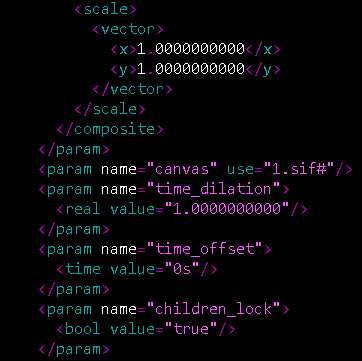
 ![PartOfXML](https://forums.synfig.org/uploads/default/original/2X/9/919e6fff9d9b509aefa049fb4fb3890c2c73b4a0.png)  
For editing, I recommend Notepad++, it’s free. Other editors may or may not end up messing up the file’s structure.

Now, if file does open after this, to re-import characters hit Menu-\>File-\>Import.  
If still no luck, send me the problematic file in a private message, I’ll fix it for you.

> [@mythieval](#):
>
> Also how does this error usually occur?

It occurs when your imported characters were located on a different drive that’s now gone. Maybe your project in C:\Animation\hundredyearwar but you characters were imported from a flash drive or a network resource that’s now resides on a different letter. It’s just a guess though.

---

<div class="post-metadata">

### Author: ![robertojguerra](https://forums.synfig.org/user_avatar/forums.synfig.org/robertojguerra/32/8271_2.png) [@robertojguerra](https://forums.synfig.org/u/robertojguerra)
#### Post date: [May 15, 2026, 3:38pm UTC](https://forums.synfig.org/t/unable-to-load-file-cant-find-linked-file/14179/6 "2026-05-15T15:38:58Z")

</div>

I am wondering about this way Synfig works with linked files.

In AutoCAD, there’s a dialog box that offers manual fixing of lost files that the XREF objects look for. I am not asking for that, but has anyone figured out a way to make this possible?

For example if I want to change the file name of some Synfig arms, legs, heads, to keep it organized. I would like to fix the Synfig project where I imported everything. Maybe there’s a GUI XML editor, with find/replace function?

---

<div class="post-metadata">

### Author: ![BobSynfig](https://forums.synfig.org/user_avatar/forums.synfig.org/bobsynfig/32/175_2.png) [@BobSynfig](https://forums.synfig.org/u/BobSynfig)
#### Post date: [May 15, 2026, 7:49pm UTC](https://forums.synfig.org/t/unable-to-load-file-cant-find-linked-file/14179/7 "2026-05-15T19:49:44Z")

</div>

> I am wondering about this way Synfig works with linked files.

[![](https://img.youtube.com/vi/529fokebZuI/maxresdefault.jpg "Lesson 10: Linking Files") ](https://www.youtube.com/watch?v=529fokebZuI)
> In AutoCAD, there’s a dialog box that offers manual fixing of lost files that the XREF objects look for. I am not asking for that, but has anyone figured out a way to make this possible?

The main issue is tu use fully qualified path instead of relative ones (especially in the same directory, sub-directory (or even a parent).  
The missing file here is  
`D:\Animations\hundredyearwar\characters\characters.sif`  
The most simple is to place another sif file at this place, then the main sif will open, and then you will be able to modify it in the GUI.

> Maybe there’s a GUI XML editor, with find/replace function?

You don’t need an XML editor, as mentionned before by @Svarov, Notepad++ is perfect for this.

Note: place your assets in a sub-directory and when you will import them, if you see the fully qualified filename, replace it by a relative one like `./characters/characters.sif`

---

<div class="post-metadata">

### Author: ![rodolforg](https://forums.synfig.org/letter_avatar_proxy/v4/letter/r/c68b51/32.png) [@rodolforg](https://forums.synfig.org/u/rodolforg)
#### Post date: [May 16, 2026, 12:02pm UTC](https://forums.synfig.org/t/unable-to-load-file-cant-find-linked-file/14179/8 "2026-05-16T12:02:37Z")

</div>

I did start to work on this a while ago…  
I can’t recall why I stopped it o.O

> <https://github.com/synfig/synfig/pull/3264>
>
> Currently, Synfig doesn't load a document if something is linked to a valuenode …or canvas of a external file, and this file is not found. This usually happens when user renames, moves or deletes those files.
> 
> This PR allows Synfig Studio to track those missing files and presents a dialog where user can point the missing files to their new locations or names. If user deleted the file, however, 'nothing' can be done except creating a new file with the required library items...
> 
> The Synfig CLI is not affected by this feature/PR.
