# Suddenly unable to load file, "can't find linked file"
**URL:** https://forums.synfig.org/t/suddenly-unable-to-load-file-cant-find-linked-file/11478
**Category:** Support
**Created:** [October 28, 2020, 10:10pm UTC](https://forums.synfig.org/t/suddenly-unable-to-load-file-cant-find-linked-file/11478 "2020-10-28T22:10:06Z")
**Posts on this page:** 8
**Page:** 1
### Author:  [@Aven](https://forums.synfig.org/u/Aven)
#### Post date: [October 28, 2020, 10:10pm UTC](https://forums.synfig.org/t/suddenly-unable-to-load-file-cant-find-linked-file/11478/1 "2020-10-28T22:10:06Z")
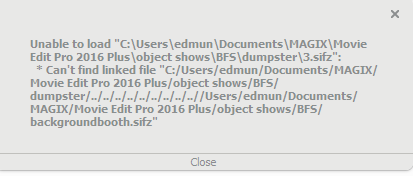
Without changing anything or moving files, suddenly I can’t open files I was working on an hour ago, and any new files I save and close also can’t be reopened. Error message says it can’t find the linked file but nothing has been moved.
Any help would be appreciated, I don’t know much about this software but am trying to help my kid who’s trying to learn basic animation.
Image of error message attached.
---
### Author:  [@BobSynfig](https://forums.synfig.org/u/BobSynfig)
#### Post date: [October 28, 2020, 11:40pm UTC](https://forums.synfig.org/t/suddenly-unable-to-load-file-cant-find-linked-file/11478/2 "2020-10-28T23:40:21Z")
[https://forums.synfig.org/search?q=can%E2%80%99t%20find%20linked%20file](https://forums.synfig.org/search?q=can%E2%80%99t%20find%20linked%20file)
> [@Can't find linked file](https://forums.synfig.org/t/cant-find-linked-file/4081):
>
> I am getting the following error when I try to open my file and the file is where it has always been. It started when I tried to open the animation on another computer with a syncd dropbox folder but now I get the same error on my original file on my original computer. I am using .sif files from Inkscape in my animation. Any ideas? I don’t really mind starting over if necessary but I don’t want it to happen again. Should I embed all my .sif files as I import them? Dan
😉
---
### Author:  [@rodolforg](https://forums.synfig.org/u/rodolforg)
#### Post date: [October 28, 2020, 11:57pm UTC](https://forums.synfig.org/t/suddenly-unable-to-load-file-cant-find-linked-file/11478/3 "2020-10-28T23:57:05Z")
(btw what a weird ‘relative’ path synfig shows – or stored?…)
---
### Author:  [@Aven](https://forums.synfig.org/u/Aven)
#### Post date: [October 28, 2020, 11:59pm UTC](https://forums.synfig.org/t/suddenly-unable-to-load-file-cant-find-linked-file/11478/4 "2020-10-28T23:59:51Z")
Thanks—I did see that, but I’m afraid I don’t know how it can help me; I may just not understand enough. I can’t save the file in a different format because I can’t open it; if I rename the file as just .sif then I get a different error message if I try to open it. I also hope to figure out what’s happened so that I don’t keep getting unusable files every time I create a new one.
---
### Author:  [@rodolforg](https://forums.synfig.org/u/rodolforg)
#### Post date: [October 29, 2020, 12:13am UTC](https://forums.synfig.org/t/suddenly-unable-to-load-file-cant-find-linked-file/11478/5 "2020-10-29T00:13:42Z")
Renaming it to .sif won’t solve it.
To solve this strange problem, you need to decompress the sifz and manually edit the xml file…
As you are a Windows user, please take a look: [Synfig immediately crashes, no message](https://forums.synfig.org/t/synfig-immediately-crashes-no-message/11261/2)
What version of synfig version are you using? 1.2.2 or 1.3.16?
---
### Author:  [@Aven](https://forums.synfig.org/u/Aven)
#### Post date: [October 29, 2020, 8:31pm UTC](https://forums.synfig.org/t/suddenly-unable-to-load-file-cant-find-linked-file/11478/6 "2020-10-29T20:31:43Z")
version 1.2.2 and i dont know how to edit it
---
### Author:  [@Aven](https://forums.synfig.org/u/Aven)
#### Post date: [October 29, 2020, 10:31pm UTC](https://forums.synfig.org/t/suddenly-unable-to-load-file-cant-find-linked-file/11478/7 "2020-10-29T22:31:37Z")
So, I tried the directions in the link – though I’m not quite sure which file I should be trying to uncompress, the one I’m working on or the one that it says it can’t find the link to? If the former, the site said it couldn’t recognise the file type; the latter, it worked and I was able to rename it, but then Synfig said there was an error in the file and wouldn’t let me import it.
Also, I’m just confused about the whole problem – all the files we’ve been working with up until now have been .sifz, and they’ve worked fine; and I can still open any file saved before Tuesday, with same file extension. It’s only files saved on Tuesday or since – I can create a file, but once it’s saved, it can’t be re-opened.
I’m sorry if my understanding of this stuff isn’t good enough to explain the problem or understand the potential solutions. :-/
---
### Author:  [@rodolforg](https://forums.synfig.org/u/rodolforg)
#### Post date: [October 29, 2020, 11:58pm UTC](https://forums.synfig.org/t/suddenly-unable-to-load-file-cant-find-linked-file/11478/8 "2020-10-29T23:58:57Z")
It’s not that trivial, and sorry I didn’t explain you properly. I’m not a native speaker, so I avoid type too much 🙂
Your .sifz file (“3.sifz”) points to/links to another .sifz file (“backgroundbooth.sifz”). Somehow, it stores the wrong relative path to that linked file. You said you didn’t move any file, so it’s a bug. I think it’s exclusive to Windows. Anyway we shall fix it as soon as we can discover the reason.
For solving your problem, you can change ‘by hand’ the filepath to “backgroundbooth.sifz”.
The sifz file format is a compressed version of sif file format. In its turn, sif is a text file with a XML contents: you can open a .sif file in Windows Notepad app (or notepad++ and alike), search for the wrong (and bizarre) file path to “backgroundbooth.sifz” and edit it to point to correct path.
You can get the .sif contents of a .sifz file by uncompressing it. Linux provides ‘native’ tools to do it.
As you’re a Windows user, you can use that site to convert the compression Synfig uses to the well-known .zip . The site I linked you ([https://online-converting.com/archives/convert-to-zip/](https://online-converting.com/archives/convert-to-zip/)) changed a bit since last time I use it, but I think you can do it this way:
1. Rename the problematic file “3.sifz” to “3.sif.gz”
2. Access the converter website, upload the file to convert it to .zip
3. Uncompress/Extract the contents: it’s should get a single file from the archive: a .sif file (even if it doesn’t have this extension)
4. Change its extension to .txt and open in Notepad.
5. Search for “backgroundbooth.sifz”
6. Change the string with the correct path:
- it can be an absolute path (eg. “C:\Users…”), or
- a relative path:
- if they’re in same folder, just the “backgroundbooth.sifz” is enough;
- if “backgroundbooth.sifz” is in a ‘inner’ folder called “resources”, for example, replace the wrong filepath with “resources/backgroundbooth.sifz”; or
- if “backgroundbooth.sifz” is in “outer” folder: let’s say the parent folder, you should write “…\backgroundbooth.sifz” ("…" means parent folder)
7. Save it
8. Rename it with a .sif extension.
9. Open it with Synfig Studio 🙂