# Scaling circle with outline
**URL:** https://forums.synfig.org/t/scaling-circle-with-outline/12425
**Category:** Drawing related help
**Created:** [July 30, 2021, 7:04pm UTC](https://forums.synfig.org/t/scaling-circle-with-outline/12425 "2021-07-30T19:04:46Z")
**Posts on this page:** 5
**Page:** 1
### Author:  [@Arturo](https://forums.synfig.org/u/Arturo)
#### Post date: [July 30, 2021, 7:04pm UTC](https://forums.synfig.org/t/scaling-circle-with-outline/12425/1 "2021-07-30T19:04:46Z")
Hi everyone,
This might be a silly question, but why, if I change the radius of a circle drawn in Synfig, the outline doesn’t scale with it? Every other operation seems to work on either of them.
To scale radius of both layers, I always have to group them and then change the size in transformation property.
Is it a bug, am I missing something or simply the radius of shape is not connected with radius of the outline (the outline doesn’t have the radius property, so that would be the most logical answer).
I’ve searched the forum for related topics, but I didn’t find the answer there.
And also, as I am writing already, why can’t I move the origin of the group? If I group circle and it’s outline, the origin of this group is set to [0;0], not to the middle of both layers. And I can’t move it with holding CTRL key, as it was mentioned in other topics. The only workaround is to always set my shapes to [0;0] origin before grouping, to allocate origin correctly. It’s a bit annoying because sometimes I want to group shapes later, when I already placed them in their spots.
Thanks for your patience. I’m a beginner, looking for a good vector animation software. Finally came across Synfig Studio and I really hope to enjoy working with it .
---
### Author:  [@veermetri05](https://forums.synfig.org/u/veermetri05)
#### Post date: [July 31, 2021, 2:36am UTC](https://forums.synfig.org/t/scaling-circle-with-outline/12425/2 "2021-07-31T02:36:07Z")
> [@Arturo](#):
>
> if I change the radius of a circle drawn in Synfig, the outline doesn’t scale with it?
In Synfig, the outline and the shape (circle, rectangle, star layer, or region layer) are independent of its outlines (outline and advanced outline).
If a shape is region layer. Then the outlines are connected. So when you move the vertex the outline also changes accordingly.
This doesn’t occur with other layers like Circle Layer, Rectangle Layer, Star Layer, because an outline is made up of vertex. And these layers are not made up of vertex but of properties that vary depending on the layer.
> [@Arturo](#):
>
> To scale the radius of both layers, I always have to group them and then change the size in the transformation property.
For now, that is the only way you can scale both of them together.
> [@Arturo](#):
>
> or simply the radius of shape is not connected with radius of the outline
Yes, that is the reason.
> [@Arturo](#):
>
> why can’t I move the origin of the group? If I group circle and its outline, the origin of this group is set to [0;0], not to the middle of both layers.
You can move the center of the group with the handle that is below the green handle (sort of purple color)
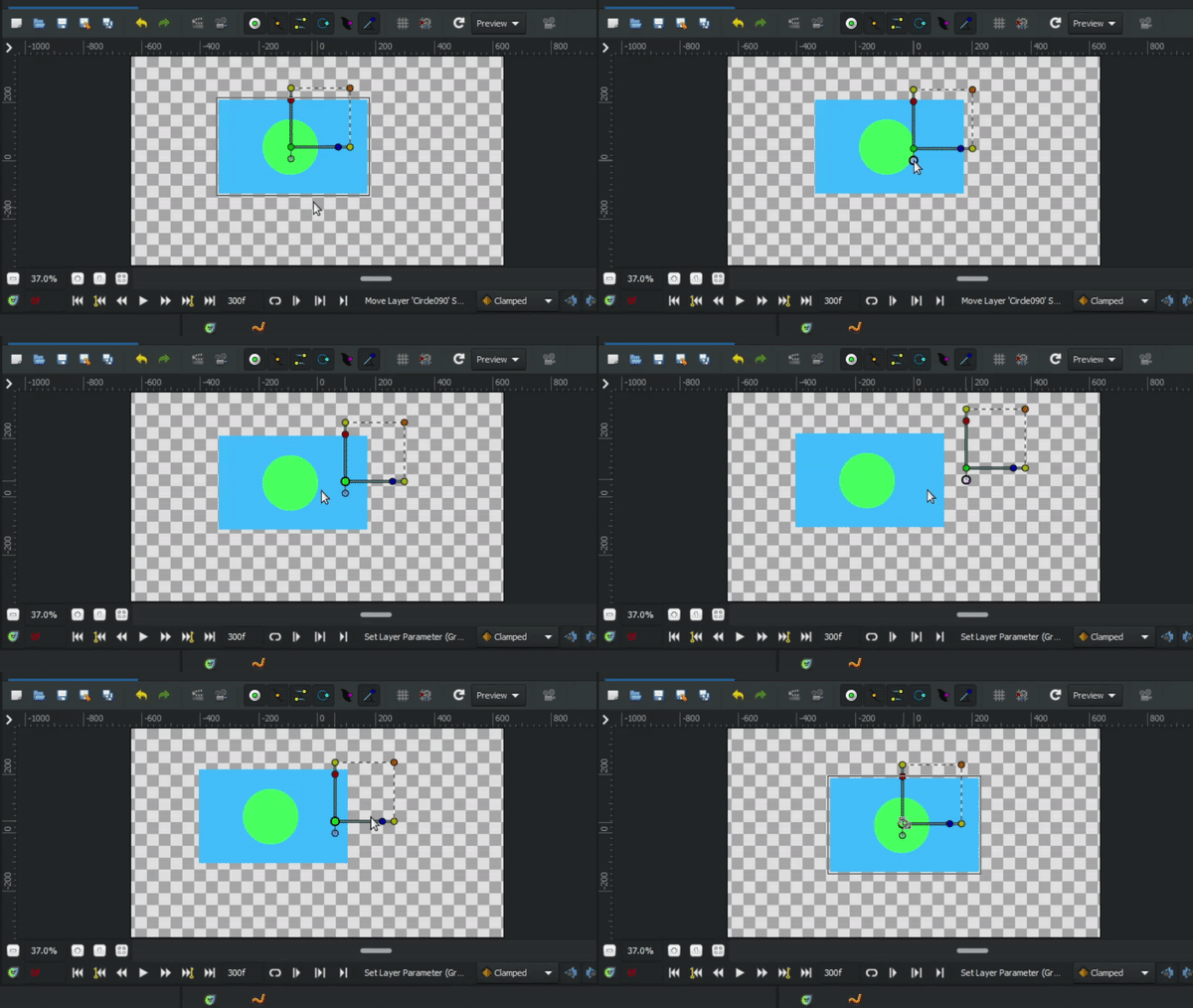
> [@Arturo](#):
>
> The only workaround is to always set my shapes to [0;0] origin before grouping, to allocate origin correctly. It’s a bit annoying because sometimes I want to group shapes later when I already placed them in their spots.
I have created a plugin that would set the origin of shapes to the center.
Here it is
> [@A plugin origin to the center of object](https://forums.synfig.org/t/a-plugin-origin-to-the-center-of-object/12119/2):
>
> An update to the plugin ! Now supports group layer centers the group layer origin. [Set the origin to center.zip](https://forums.synfig.org/uploads/short-url/8vaBeg5d1N2t1V3j86ympo9FzRU.zip) (4.1 KB) Now centers all the shapes and group layers origin. If you find any bugs then please tell me, if possible provide the screenshot of error shown if something goes wrong. Or the sif file you are working with. And help would be appreciated.
Synfig can be a really good tool to animate vector animation, everything within the software itself is sufficient to create high quality animations. But Synfig doesn’t feel user friendly, but it has enough potential to create complex animation. [Here are my animation](https://forums.synfig.org/t/animation-in-synfig-micro-animation-by-me-project-files-included/12092) (with files) so that you can see and study them.
---
### Author:  [@rodolforg](https://forums.synfig.org/u/rodolforg)
#### Post date: [July 31, 2021, 3:19am UTC](https://forums.synfig.org/t/scaling-circle-with-outline/12425/3 "2021-07-31T03:19:02Z")
> [@veermetri05](#):
>
> For now, that is the only way you can scale both of them together.
He could use converters to link outline vertices to circle radius… But that’s too much work 😛
> [@Arturo](#):
>
> To scale radius of both layers, I
Just adding more info on the @veermetri05 reply, in Synfig, outlines doesn’t have a primitive shape like circle, rectangle or any polygon. They are a vertex list.
---
### Author:  [@Arturo](https://forums.synfig.org/u/Arturo)
#### Post date: [July 31, 2021, 7:02am UTC](https://forums.synfig.org/t/scaling-circle-with-outline/12425/4 "2021-07-31T07:02:59Z")
> [@rodolforg](#):
>
> He could use converters to link outline vertices to circle radius… But that’s too much work 😛
I make fundamental physics animations. I have to deal with a lot of circles - even one or two clicks less make my life easier 😃
And to clarify - that was just counterintuitive for me. If every other transformation works on both of them, why changing radius doesn’t? Now I know how it works and thank you both for clarification.
> [@veermetri05](#):
>
> You can move the center of the group with the handle that is below the green handle (sort of purple color)
I don’t know why I didn’t try to mess with that handle but… It works! Thank you very much.
The last thing that I can’t solve is canvas and it’s properties. If my canvas is 400x400px and I import image made in Corel that’s 400x400px, I expect it will fit perfectly into the canvas. But it doesn’t, it’s bigger. I saw on Youtube tutorials that you have to mess with this Image Span property. Is there a value of that span that will make my Image Size and Image Area simply 1:1? I don’t really get the purpose of this image span…
---
### Author:  [@rodolforg](https://forums.synfig.org/u/rodolforg)
#### Post date: [July 31, 2021, 12:23pm UTC](https://forums.synfig.org/t/scaling-circle-with-outline/12425/5 "2021-07-31T12:23:34Z")
> [@Arturo](#):
>
> The last thing that I can’t solve is canvas and it’s properties. If my canvas is 400x400px and I import image made in Corel that’s 400x400px, I expect it will fit perfectly into the canvas. But it doesn’t, it’s bigger. I saw on Youtube tutorials that you have to mess with this Image Span property. Is there a value of that span that will make my Image Size and Image Area simply 1:1? I don’t really get the purpose of this image span…
I tested what you say and it is an error since version 1.2.1 (at least).
I submitted a PR right now for fixing it [[Studio] fix image size when importing onto canvas with non-standard size by rodolforg · Pull Request #2252 · synfig/synfig · GitHub](https://github.com/synfig/synfig/pull/2252)
I don’t know when it will be available on official versions though.