# My first character
**URL:** https://forums.synfig.org/t/my-first-character/11988
**Category:** Compositions and effects
**Created:** [March 29, 2021, 5:41am UTC](https://forums.synfig.org/t/my-first-character/11988 "2021-03-29T05:41:01Z")
**Posts on this page:** 8
**Page:** 1
### Author:  [@Svarov](https://forums.synfig.org/u/Svarov)
#### Post date: [March 29, 2021, 5:41am UTC](https://forums.synfig.org/t/my-first-character/11988/1 "2021-03-29T05:41:01Z")
Hey guys!
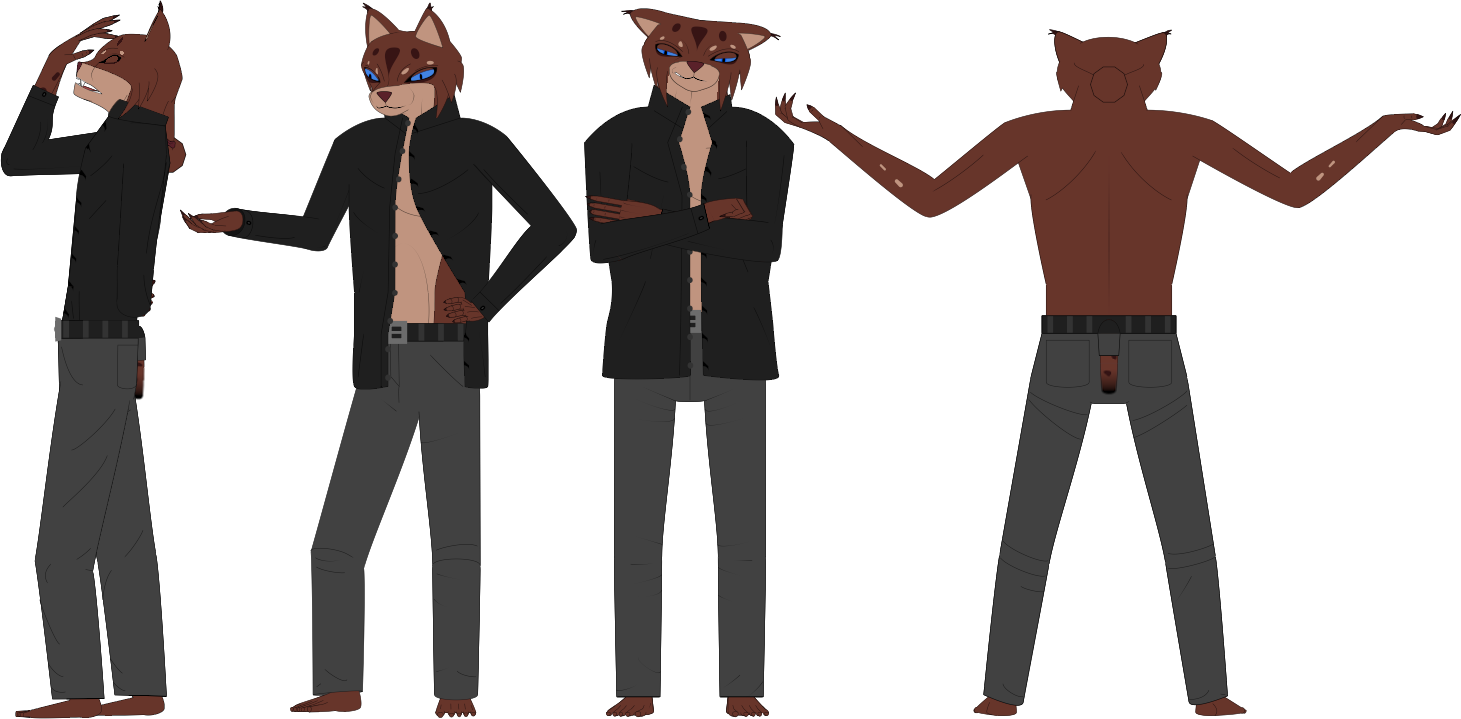
I’ve been busy learning design, you know, color theory and all that stuff to make my first full character in Synfig. So I came up with anthropomorphic lynx (cuz I like animals and cat family especially). It’s basically my avatar. Here are some poses:
And here’s the face close up:
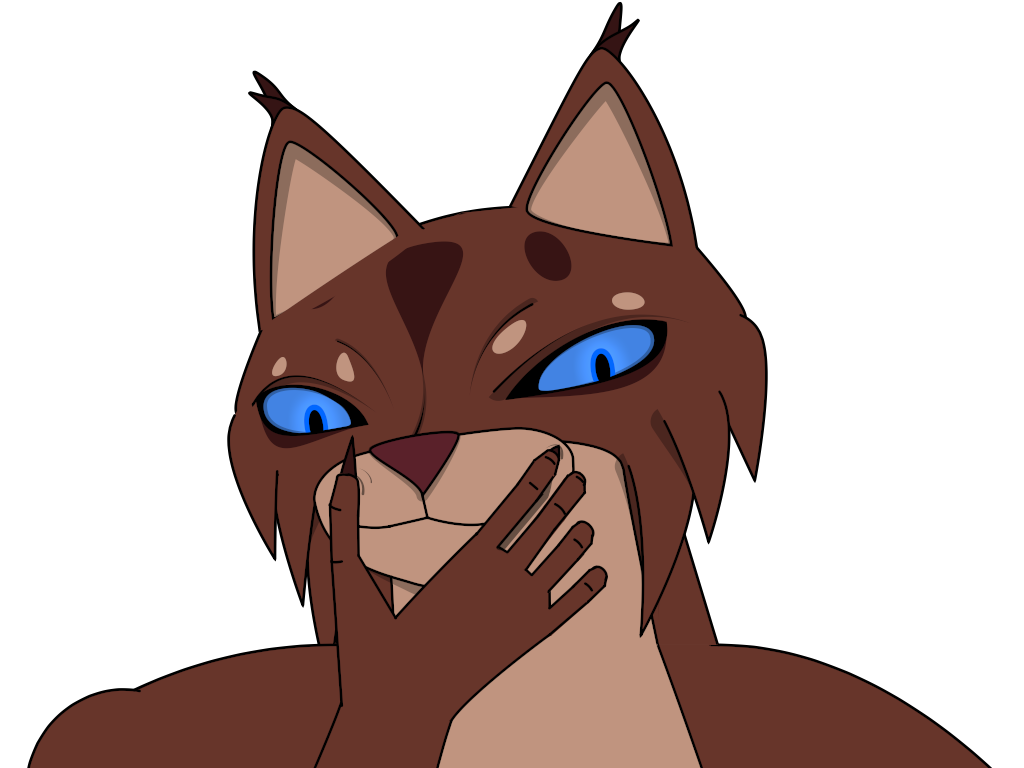
So what do you think? It’s my first character, so I need some opinions. Is anatomy correct (proportions)? Are colors toxic? If you were to find this character in a cartoon, would you find the design appealing or would you go “Ew, what a gross design!”?
P.S. There are things I am still working on of course, like how to make shadowing easier, how to make fur without introducing a lot of additional work animation wise and so on.
---
### Author:  [@Darkspace\_be](https://forums.synfig.org/u/Darkspace_be)
#### Post date: [July 28, 2021, 1:56pm UTC](https://forums.synfig.org/t/my-first-character/11988/2 "2021-07-28T13:56:45Z")
Hi,
Looking good. Colors are fine. Proportions are ok. You don’t have to worry about proportions since it’s an anthropomorphic character so you can play with them and exaggerate. Nice detail that you kept a whole in his pants for his tail, haha. 🙂
Greetz.
---
### Author:  [@Vinny58](https://forums.synfig.org/u/Vinny58)
#### Post date: [July 28, 2021, 2:53pm UTC](https://forums.synfig.org/t/my-first-character/11988/3 "2021-07-28T14:53:28Z")
I think it looks pretty nice!
---
### Author:  [@Svarov](https://forums.synfig.org/u/Svarov)
#### Post date: [July 29, 2021, 7:21am UTC](https://forums.synfig.org/t/my-first-character/11988/4 "2021-07-29T07:21:19Z")
@Darkspace_be @Vinny58 Thanks, guys! I needed some reassurance.
I did slightly change the design. Made hair locks more curvy, adjusted brows, etc. The final version will be in my next animation. I am trying to make it with a heavy background, so it will take a while.
---
### Author:  [@bbrizzy89](https://forums.synfig.org/u/bbrizzy89)
#### Post date: [August 10, 2021, 2:22am UTC](https://forums.synfig.org/t/my-first-character/11988/5 "2021-08-10T02:22:11Z")
Hey just seeing this but one thing that helped me a lot with my synfig characters was taking advantage of varying line width, which is thankfully easy in synfig! If you make it so only the purple width handles are available (alt+5 i believe), and just start selecting some handles to make thinner, others to make thicker, especially the ends of lines thinner, you get a natural tapering that mimics a drawn look or mimics pressure sensitivity of a pen. I think adding that to what you have might give you some exciting results!
---
### Author:  [@Svarov](https://forums.synfig.org/u/Svarov)
#### Post date: [August 10, 2021, 5:26am UTC](https://forums.synfig.org/t/my-first-character/11988/6 "2021-08-10T05:26:37Z")
Thanks for the tip but it seems like a lot of additional work because you need to insert more width points to make it work. I usually have like 2 or maximum 4 width point on adv. outlines.
It does look better though, so I might experiment with it when I actually start animating.
---
### Author:  [@Kai](https://forums.synfig.org/u/Kai)
#### Post date: [August 10, 2021, 5:51am UTC](https://forums.synfig.org/t/my-first-character/11988/7 "2021-08-10T05:51:29Z")
You can always use outline layer instead of advanced outline layer and get more width points by default.
---
### Author:  [@bbrizzy89](https://forums.synfig.org/u/bbrizzy89)
#### Post date: [August 10, 2021, 7:20am UTC](https://forums.synfig.org/t/my-first-character/11988/8 "2021-08-10T07:20:12Z")
Ah yes - I tend to use outline rather than advanced outline, and so even with two or three vertices in a line there is a nice effect to varying width. Either way, happy animating!