# Is there any macOS or KDE user here able to build Synfig from sourcecode?
**URL:** https://forums.synfig.org/t/is-there-any-macos-or-kde-user-here-able-to-build-synfig-from-sourcecode/17189
**Category:** Debugging
**Tags:** macosx
**Created:** [July 18, 2026, 7:05pm UTC](https://forums.synfig.org/t/is-there-any-macos-or-kde-user-here-able-to-build-synfig-from-sourcecode/17189 "2026-07-18T19:05:26Z")
**Posts on this page:** 7
**Page:** 1
### Author:  [@rodolforg](https://forums.synfig.org/u/rodolforg)
#### Post date: [July 18, 2026, 7:05pm UTC](https://forums.synfig.org/t/is-there-any-macos-or-kde-user-here-able-to-build-synfig-from-sourcecode/17189/1 "2026-07-18T19:05:26Z")
I need to test a change I made in Synfig code that updates (a bit) the framework we use behind the scenes for the GUI. For those more experienced, we still used some stuff from GTK2 and I tried to get rid of them - essencially `Gtk::Action` → `Gio::Action`.
The main benefits for final users I recall:
- New actions are now able to have custom/user shortcuts
- On macOS, the main menu should appear at the top of screen, like native apps. Linux KDE users [have this option too](https://www.youtube.com/watch?v=KAZY79W5yOI).
- For macOS, some shortcuts/hotkeys/accelerator now should use Command key `⌘` (e.g. for copy/paste actions), and not unnatural `control` key.
- Every button would have a tooltip that displays the corresponding shortcuts/hotkeys/accelerators.
- The shortcuts/hotkeys/accelerator map file for storing custom/user configuration has now changed from `accelrc` to `accelerators`.
For devs:
- Cleaner code (or not - invisible to final user anyway)
- New widgets can be easier used/created (like a menu for selecting or **searching** for layer type to be added)
So, if you are a macOS user (or KDE user with global menu) and you want to help me to test it, please follow these steps for building SynfigStudio by its source code:
> **[Building Synfig using command line — Synfig developers docs documentation](https://synfig-docs-dev.readthedocs.io/en/latest/building/Building%20Synfig.html)**
But you have to change the following command-line. Instead of
```auto
git clone https://github.com/synfig/synfig.git ~/synfig.git
```
type this command:
```auto
git clone https://github.com/rodolforg/synfig.git --single-branch --branch=new-go-actions ~/synfig.git
```
After building Synfig, please check if there is any missing menu item (or working incorrectly) or _any_ button (in any panel!) with weird behavior.
Thank you all 😉

---
### Author:  [@BobSynfig](https://forums.synfig.org/u/BobSynfig)
#### Post date: [July 18, 2026, 11:00pm UTC](https://forums.synfig.org/t/is-there-any-macos-or-kde-user-here-able-to-build-synfig-from-sourcecode/17189/2 "2026-07-18T23:00:33Z")

---
### Author:  [@robertojguerra](https://forums.synfig.org/u/robertojguerra)
#### Post date: [July 19, 2026, 3:41am UTC](https://forums.synfig.org/t/is-there-any-macos-or-kde-user-here-able-to-build-synfig-from-sourcecode/17189/3 "2026-07-19T03:41:55Z")
I use Linux Mint with cinnnamon, not KDE
would it be useful if I tried it?
---
### Author:  [@rodolforg](https://forums.synfig.org/u/rodolforg)
#### Post date: [July 19, 2026, 10:01am UTC](https://forums.synfig.org/t/is-there-any-macos-or-kde-user-here-able-to-build-synfig-from-sourcecode/17189/4 "2026-07-19T10:01:34Z")
Yes, it would be. You cannot test the global menu, but you can still test the regular menu and all buttons XD
---
### Author:  [@robertojguerra](https://forums.synfig.org/u/robertojguerra)
#### Post date: [July 20, 2026, 8:36am UTC](https://forums.synfig.org/t/is-there-any-macos-or-kde-user-here-able-to-build-synfig-from-sourcecode/17189/5 "2026-07-20T08:36:33Z")
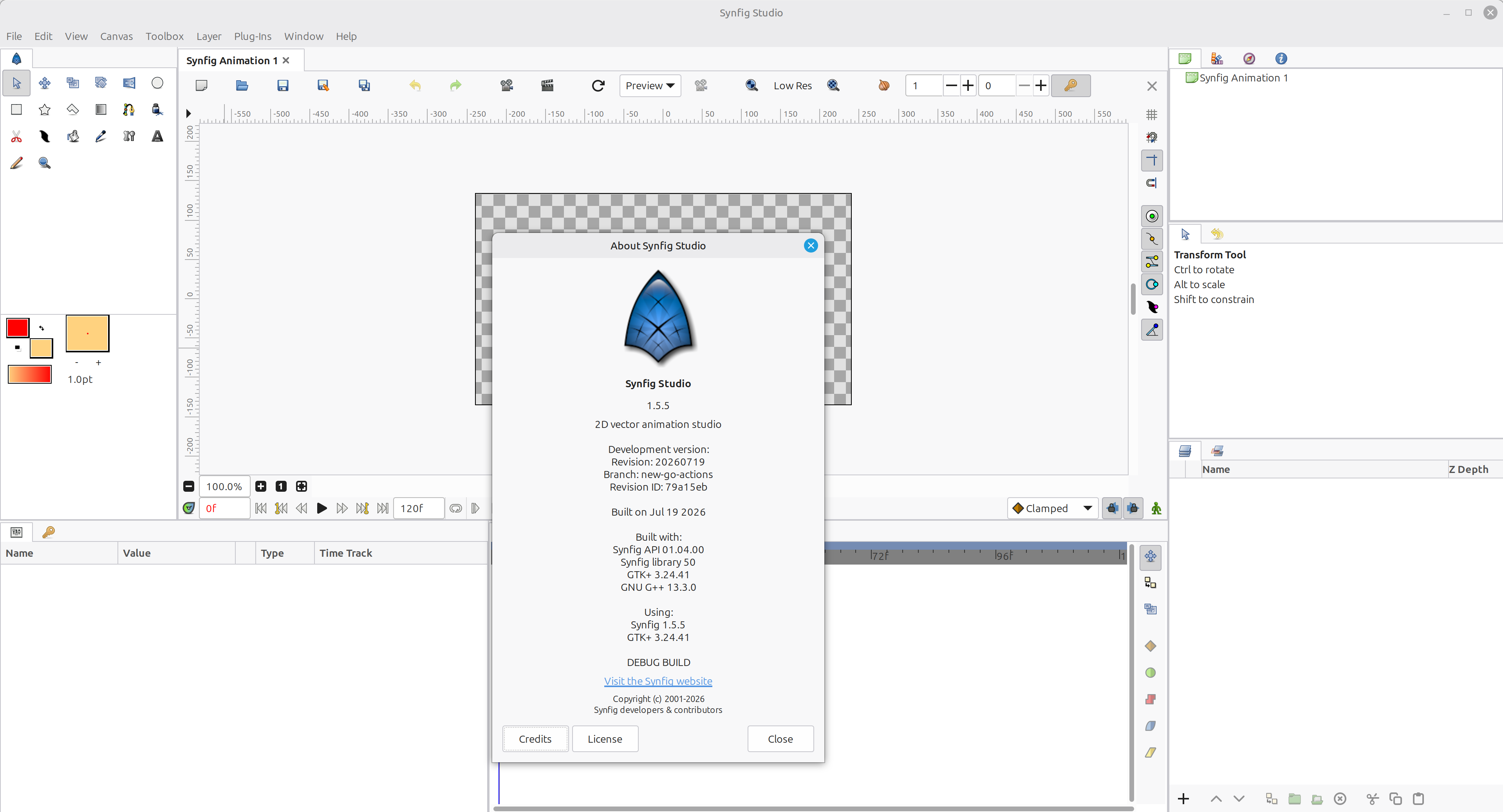
I tested in Linux mint 22.3 it and it looks like all the buttons and menubar items are present
---
### Author:  [@rodolforg](https://forums.synfig.org/u/rodolforg)
#### Post date: [July 20, 2026, 11:32am UTC](https://forums.synfig.org/t/is-there-any-macos-or-kde-user-here-able-to-build-synfig-from-sourcecode/17189/6 "2026-07-20T11:32:16Z")
Thank you.
If you detect any one not working as it should, please report it too XD
I saw the main toolbar has now wider buttons in your screenshot. I’ll work on that 🙂
---
### Author:  [@rodolforg](https://forums.synfig.org/u/rodolforg)
#### Post date: [July 26, 2026, 11:07pm UTC](https://forums.synfig.org/t/is-there-any-macos-or-kde-user-here-able-to-build-synfig-from-sourcecode/17189/7 "2026-07-26T23:07:34Z")
So, no macOs users here ☹
Well, at least this topic made @robertojguerra unravel the world of building Synfig XD
> [@rodolforg](#):
>
> I saw the main toolbar has now wider buttons in your screenshot. I’ll work on that 🙂
My building didn’t give those wide buttons ☹