# Install Synfig on Mac using macport
**URL:** https://forums.synfig.org/t/install-synfig-on-mac-using-macport/1449
**Category:** Building synfig
**Created:** [June 18, 2011, 12:48pm UTC](https://forums.synfig.org/t/install-synfig-on-mac-using-macport/1449 "2011-06-18T12:48:34Z")
**Posts on this page:** 20
**Page:** 2
### Author:  [@ulrik](https://forums.synfig.org/u/ulrik)
#### Post date: [July 19, 2011, 10:25am UTC](https://forums.synfig.org/t/install-synfig-on-mac-using-macport/1449/21 "2011-07-19T10:25:25Z")
> [@Rafael](#):
>
> I’ve installed Synfig 0.62.02 on my MacBook. Now I’m trying to install the new version, but I have this:
> [attachment=0]instalar Synfig 0.63.png[/attachment]
> Synfig 0.62.02 remains installed. How can I install 0.63?
> Thanks.
Run:
“sudo port upgrade synfigstudio” in terminal
it will upgrade etl, synfig and synfigstudio to v.0.63.00\_0
---
### Author:  [@ulrik](https://forums.synfig.org/u/ulrik)
#### Post date: [July 19, 2011, 10:27am UTC](https://forums.synfig.org/t/install-synfig-on-mac-using-macport/1449/22 "2011-07-19T10:27:16Z")
I forgot to ask you, do you have synfig installed via macport or fink?
cause this is using macport
---
### Author:  [@Rafael](https://forums.synfig.org/u/Rafael)
#### Post date: [July 19, 2011, 11:33am UTC](https://forums.synfig.org/t/install-synfig-on-mac-using-macport/1449/23 "2011-07-19T11:33:50Z")
macport.
I’ve tryed, but I’ve the same result:
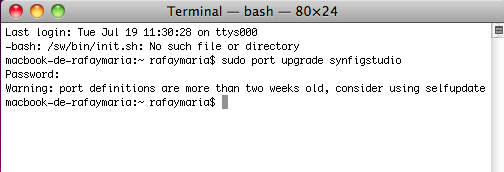
What is wrong?
Thanks.
---
### Author:  [@Rafael](https://forums.synfig.org/u/Rafael)
#### Post date: [July 19, 2011, 11:36am UTC](https://forums.synfig.org/t/install-synfig-on-mac-using-macport/1449/24 "2011-07-19T11:36:37Z")
perhaps I must upgrade macports? I don’t know (in fact, I know nothing about) ☹
---
### Author:  [@ulrik](https://forums.synfig.org/u/ulrik)
#### Post date: [July 19, 2011, 1:23pm UTC](https://forums.synfig.org/t/install-synfig-on-mac-using-macport/1449/25 "2011-07-19T13:23:07Z")
> [@Rafael](#):
>
> perhaps I must upgrade macports? I don’t know (in fact, I know nothing about) ☹
Try this in terminal:
1. sudo port -v selfupdate
it will take a while, when it’s ready then:
2. sudo port upgrade synfigstudio
---
### Author:  [@Rafael](https://forums.synfig.org/u/Rafael)
#### Post date: [July 19, 2011, 1:25pm UTC](https://forums.synfig.org/t/install-synfig-on-mac-using-macport/1449/26 "2011-07-19T13:25:55Z")
Thanks. I just found this: [http://guide.macports.org/chunked/using.html](http://guide.macports.org/chunked/using.html)
It’s the same as you say. I’m just updating Synfig now. I’ll tell you when it is finished.
---
### Author:  [@ulrik](https://forums.synfig.org/u/ulrik)
#### Post date: [July 19, 2011, 1:39pm UTC](https://forums.synfig.org/t/install-synfig-on-mac-using-macport/1449/27 "2011-07-19T13:39:47Z")
> [@Rafael](#):
>
> Thanks. I just found this: [http://guide.macports.org/chunked/using.html](http://guide.macports.org/chunked/using.html)
>
> It’s the same as you say. I’m just updating Synfig now. I’ll tell you when it is finished.
Good luck! 😃
---
### Author:  [@Rafael](https://forums.synfig.org/u/Rafael)
#### Post date: [July 19, 2011, 1:52pm UTC](https://forums.synfig.org/t/install-synfig-on-mac-using-macport/1449/28 "2011-07-19T13:52:52Z")
Uaaaaaaaaaaaaaaaaaaaaaaaaaaaaaaaaaaaaaaaaaaaaaaaaaaau!
IT’S DONE: I’VE SYNFIG 0.63.00 😃😃😃😃😃😃😃😃😃
Thanks a lot, ulrik, Genete and all the Synfig team.
---
### Author:  [@Genete](https://forums.synfig.org/u/Genete)
#### Post date: [July 19, 2011, 3:15pm UTC](https://forums.synfig.org/t/install-synfig-on-mac-using-macport/1449/29 "2011-07-19T15:15:33Z")
> [@Rafael](#):
>
> Uaaaaaaaaaaaaaaaaaaaaaaaaaaaaaaaaaaaaaaaaaaaaaaaaaaau!
> IT’S DONE: I’VE SYNFIG 0.63.00 😃😃😃😃😃😃😃😃😃
> Thanks a lot, ulrik, Genete and all the Synfig team.
Congratulationsl!
Now that you have Synfig Studio 0.63.00 at Mac. can you make me a favour?
Please import this file (SVG) and tell me what do you obtain. I’m curious to know if the svg import problem we have with Ubuntu is repeatable in Mac. I expect to obtain a red circle but when I import the SVG on Ubuntu I get a deformed blob.

Thanks!
-G
---
### Author:  [@ulrik](https://forums.synfig.org/u/ulrik)
#### Post date: [July 19, 2011, 4:39pm UTC](https://forums.synfig.org/t/install-synfig-on-mac-using-macport/1449/30 "2011-07-19T16:39:29Z")
After import it looks like this:
[musikboden.se/synfigfiles/dibujo.png](http://www.musikboden.se/synfigfiles/dibujo.png)
---
### Author:  [@Rafael](https://forums.synfig.org/u/Rafael)
#### Post date: [July 19, 2011, 7:53pm UTC](https://forums.synfig.org/t/install-synfig-on-mac-using-macport/1449/31 "2011-07-19T19:53:41Z")
I’ve the same as ulrik:

But I’ve a question: I’ve installed Synfig 0.62.00 (iMac), and I can’t see anything when I import the svg file. I don’t know if it’s normal. (anyway, I’m going to update to 0.63)
---
### Author:  [@Genete](https://forums.synfig.org/u/Genete)
#### Post date: [July 20, 2011, 6:22am UTC](https://forums.synfig.org/t/install-synfig-on-mac-using-macport/1449/32 "2011-07-20T06:22:43Z")
Thank you both. That’s what I obtain in Ubuntu too. Weirdly in Fedora I obtain a perfect circle (what’s supposed to be).
> [@](#):
>
> But I’ve a question: I’ve installed Synfig 0.62.00 (iMac), and I can’t see anything when I import the svg file. I don’t know if it’s normal. (anyway, I’m going to update to 0.63)
In 0.62.00 or 0.62.02 just repeat the import opertaion and it should work fine.
I can understand that we might have broken the SVG import library for all the cases but what I can’t understand is why in Fedora it works fine and not in the rest. I swear that there is something extra apart of the code of Synfig.
-G
---
### Author:  [@Rafael](https://forums.synfig.org/u/Rafael)
#### Post date: [July 20, 2011, 6:31am UTC](https://forums.synfig.org/t/install-synfig-on-mac-using-macport/1449/33 "2011-07-20T06:31:57Z")
if you need more proof, tell me.
> [@](#):
>
> In 0.62.00 or 0.62.02 just repeat the import opertaion and it should work fine.
I have upgraded to the latest version on my two machines.Thanks anyway. 😃
---
### Author:  [@ulrik](https://forums.synfig.org/u/ulrik)
#### Post date: [October 6, 2011, 7:39pm UTC](https://forums.synfig.org/t/install-synfig-on-mac-using-macport/1449/34 "2011-10-06T19:39:15Z")
Hi, I am unable to install the latest synfig release with macport, I know macport is updated with the latest synfig port but I get this error when trying to install Synfig 0.63.02:
—\> Verifying checksum(s) for synfig
Error: Checksum (rmd160) mismatch for synfig-0.63.02.tar.gz
Error: Checksum (sha256) mismatch for synfig-0.63.02.tar.gz
Error: Target org.macports.checksum returned: Unable to verify file checksums
Anybodu know why this happens?
cheers / Ulrik
---
### Author:  [@Genete](https://forums.synfig.org/u/Genete)
#### Post date: [October 6, 2011, 8:01pm UTC](https://forums.synfig.org/t/install-synfig-on-mac-using-macport/1449/35 "2011-10-06T20:01:23Z")
It is possible that there has been an error uploading the tarballs. I’ll check them.
-G
---
### Author:  [@ulrik](https://forums.synfig.org/u/ulrik)
#### Post date: [October 6, 2011, 10:26pm UTC](https://forums.synfig.org/t/install-synfig-on-mac-using-macport/1449/36 "2011-10-06T22:26:32Z")
Thanks Genete! 😃
---
### Author:  [@Genete](https://forums.synfig.org/u/Genete)
#### Post date: [October 7, 2011, 12:20pm UTC](https://forums.synfig.org/t/install-synfig-on-mac-using-macport/1449/37 "2011-10-07T12:20:25Z")
I’ve downloaded the files from the website links (sourceforge automatic links), placed the uncompressed files in a separated folder and have run this script to make and install in a local place. I didn’t want to install it wide system but I’m sure that replacing ‘make install’ with ‘sudo make install’, will work.
I don’t know what else to test. Looks like the tar balls are fine.
-G
[code]#!/bin/sh
CPUS=4
prefix=$(pwd)/install
export PKG\_CONFIG\_PATH="$prefix/lib/pkgconfig"
export PATH=$(pwd)/synfig-core/src/tool/.libs:$PATH
export CXX="/usr/bin/ccache /usr/bin/g++"
cd ETL-0.04.14 &&
./configure --prefix $prefix &&
make install &&
cd …/synfig-0.63.02 &&
./configure --prefix $prefix &&
make -j $CPUS install &&
cd …/synfigstudio-0.63.02 &&
./configure --prefix $prefix &&
make -j $CPUS install[/code]
---
### Author:  [@ulrik](https://forums.synfig.org/u/ulrik)
#### Post date: [October 7, 2011, 1:27pm UTC](https://forums.synfig.org/t/install-synfig-on-mac-using-macport/1449/38 "2011-10-07T13:27:44Z")
hmm…still not working, I get the same checksum error and macport will not install!
I will try to manually build it via git, thanks for the help!
cheers!
---
### Author:  [@ulrik](https://forums.synfig.org/u/ulrik)
#### Post date: [October 11, 2011, 7:37pm UTC](https://forums.synfig.org/t/install-synfig-on-mac-using-macport/1449/39 "2011-10-11T19:37:09Z")
> [@ulrik](#):
>
> hmm…still not working, I get the same checksum error and macport will not install!
> I will try to manually build it via git, thanks for the help!
>
> cheers!
Well I managed to build it on my own, and today I tried to build it with macport and it worked as well!!! I guess the port file is updated.
Conclusion, it is possible to build the latest stable release of Synfig , 0.63.02 with macport. 😃
---
### Author:  [@Genete](https://forums.synfig.org/u/Genete)
#### Post date: [October 11, 2011, 7:41pm UTC](https://forums.synfig.org/t/install-synfig-on-mac-using-macport/1449/40 "2011-10-11T19:41:43Z")
> [@ulrik](#):
>
> > [@ulrik](#):
> >
> > hmm…still not working, I get the same checksum error and macport will not install!
> > I will try to manually build it via git, thanks for the help!
> >
> > cheers!
>
> Well I managed to build it on my own, and today I tried to build it with macport and it worked as well!!! I guess the port file is updated.
> Conclusion, it is possible to build the latest stable release of Synfig , 0.63.02 with macport. 😃
So it was a wrongly ‘mackported’ tarballs right?
-G
[Previous page](https://forums.synfig.org/t/install-synfig-on-mac-using-macport/1449.md?page=1)
[Next page](https://forums.synfig.org/t/install-synfig-on-mac-using-macport/1449.md?page=3)