# Install Synfig on Mac using macport
**URL:** https://forums.synfig.org/t/install-synfig-on-mac-using-macport/1449
**Category:** Building synfig
**Created:** [June 18, 2011, 12:48pm UTC](https://forums.synfig.org/t/install-synfig-on-mac-using-macport/1449 "2011-06-18T12:48:34Z")
**Posts on this page:** 20
**Page:** 1
### Author:  [@ulrik](https://forums.synfig.org/u/ulrik)
#### Post date: [June 18, 2011, 12:48pm UTC](https://forums.synfig.org/t/install-synfig-on-mac-using-macport/1449/1 "2011-06-18T12:48:34Z")
Hi!
I have managed to build synfig (x11 version) using macport, however I am unable to import image files (png) I have libpng installed but when I run configure for synfigcore the png option is not enabled, anybody know why?
I am also unable to choose .png as an option when rendering.
Another issue is about the gui, when I try to rearrange the different windows it alway crashes with the message:
Segmentation fault.
Has this something to do with this message that I always get in terminal when I launch synfigstudio?
: (synfigstudio:73443): GLib-GObject-CRITICAL \*\*: Object class gtkmm\_\_CustomObject\_N6studio15ValueBase\_EntryE doesn’t implement property ‘editing-canceled’ from interface ‘GtkCellEditable’
This is how I install Synfig using macport:
I run this in terminal:
export PATH="/opt/local/bin:$PATH"
export ACLOCAL\_FLAGS="-I /opt/local/share/aclocal"
export PKG\_CONFIG\_PATH="/opt/local/lib/pkgconfig"
then I install cairo, cairomm
pango, pangomm
gtk2 and gtkmm (all this libraries for x11)
and libxmlxx2
I also install libpng, imagemagick, ffmpeg
after fetching the source code for ETl, Synfigcore and Synfigstudio
I follow this instructions to compile and build all:
cd synfig/ETL
export PKG\_CONFIG\_PATH=/opt/local/lib/pkgconfig
export PATH=/opt/local/bin:$PATH
autoreconf --install --force
./configure --prefix=/opt/local
sudo make install
cd synfig/synfig-core
glibtoolize --ltdl --copy --force
export PKG\_CONFIG\_PATH=/opt/local/lib/pkgconfig
export PATH=/opt/local/bin:$PATH
autoreconf --install --force
./configure --prefix=/opt/local
make
sudo make install
cd synfig/synfig-studio
export PKG\_CONFIG\_PATH=/opt/local/lib/pkgconfig
export PATH=/opt/local/bin:$PATH
autoreconf --install --force
./configure --prefix=/opt/local
make
sudo make install
It all installs nicely but something must be wrong because of the issues I mentioned in the beginning.
cheers Ulrik
---
### Author:  [@Genete](https://forums.synfig.org/u/Genete)
#### Post date: [June 18, 2011, 2:27pm UTC](https://forums.synfig.org/t/install-synfig-on-mac-using-macport/1449/2 "2011-06-18T14:27:43Z")
Hi ulrik,
I see the same message when running on linux so I don’t think it is related to the crash.
Anyway, is there any specific window that makes it crash when rearrange it? Do you have icons in the application? If you don’t have png export enabled you won’t be able to see the icons and so the install isn’t so “nicely” done 😉
Remember to completely clean any previous installation when having those strange issues. You can alternatively build and install in other place to do it freshly and check that libpng is linked properly.
-G
---
### Author:  [@ulrik](https://forums.synfig.org/u/ulrik)
#### Post date: [June 18, 2011, 2:45pm UTC](https://forums.synfig.org/t/install-synfig-on-mac-using-macport/1449/3 "2011-06-18T14:45:54Z")
Hi Genete!
Ok, so the message doesn’t have to mean anything, that’s fine.
Yes I have all the icons and can see them, I just had a thought, if I render and use the auto function and choose .png as the extension it works fine what library is used then? ffmpeg, imagemagick? or do theese libs use libpng as well?
about the gui, it doesn’t matter what window I try to rearrange it crash anyway ☹
I will do as you suggest, I will make a clean installation again, thanks for help!
cheers
---
### Author:  [@Genete](https://forums.synfig.org/u/Genete)
#### Post date: [June 18, 2011, 10:59pm UTC](https://forums.synfig.org/t/install-synfig-on-mac-using-macport/1449/4 "2011-06-18T22:59:57Z")
If as you say, png is not enabled for synfig core, it is not possible to render the icons. If you can export to png you should be able to import from png becuase both Synfig’s libraries are in the same module, and both uses libpng.
Something extra would be there.
-G
---
### Author:  [@ulrik](https://forums.synfig.org/u/ulrik)
#### Post date: [June 21, 2011, 7:17pm UTC](https://forums.synfig.org/t/install-synfig-on-mac-using-macport/1449/5 "2011-06-21T19:17:36Z")
Hi Genete!
I have found that there is a maintainer for a Synfig portfile in Macport (unfortunately not the latest version though), and I noticed there is a patch file for that version, that would patch the “mptr\_png.cpp” file inside the Synfigcore src package, so I changed the “mptr\_png.cpp” in the latest version and now Synfig is able to use the libpng as input and output 😃
For Synfig to find libpng I also had to use:
export CPPFLAGS=-I/opt/local/include
export LDFLAGS=-L/opt/local/lib
So now I am finally able to use Synfig again… 😆
However the gui issues still remains ☹
/Ulrik
---
### Author:  [@Genete](https://forums.synfig.org/u/Genete)
#### Post date: [June 21, 2011, 9:53pm UTC](https://forums.synfig.org/t/install-synfig-on-mac-using-macport/1449/6 "2011-06-21T21:53:22Z")
Hey Ulrik, can you give a help to the guys of this thread?
[lostmarble.com/forum/viewtopic.php?t=19019](http://www.lostmarble.com/forum/viewtopic.php?t=19019)
I don’t know exactly what are they talking about…
-G
---
### Author:  [@ulrik](https://forums.synfig.org/u/ulrik)
#### Post date: [June 21, 2011, 10:15pm UTC](https://forums.synfig.org/t/install-synfig-on-mac-using-macport/1449/7 "2011-06-21T22:15:02Z")
> [@Genete](#):
>
> Hey Ulrik, can you give a help to the guys of this thread?
> [lostmarble.com/forum/viewtopic.php?t=19019](http://www.lostmarble.com/forum/viewtopic.php?t=19019)
> I don’t know exactly what are they talking about…
> -G
I just did, the tricky part is the modified “mptr\_png.cpp” file I made.
line 312 in “mptr\_png.cpp”
original: a = (float)(unsigned char)png\_ptr-\>trans[row\_pointers[y]]_(1.0/255.0);
modified: a = (float)(unsigned char)png\_ptr-\>trans\_alpha[row\_pointers[y][x]]_(1.0/255.0);
it has something to do with libpng 1.4…don’t ask me… 😒
---
### Author:  [@ulrik](https://forums.synfig.org/u/ulrik)
#### Post date: [June 21, 2011, 10:21pm UTC](https://forums.synfig.org/t/install-synfig-on-mac-using-macport/1449/8 "2011-06-21T22:21:15Z")
btw, is it possible to make changes to the Macport portfile so it will install latest version of Synfig?
This is the portfile:
[trac.macports.org/browser/trunk … g/Portfile](https://trac.macports.org/browser/trunk/dports/graphics/synfig/Portfile)
as you can see it uses 2 checksums, so I guess I have to change thoose to make it work with v. 0.63.00?
at the top of the site you can also see the patch for “fix build failure with libpng 1.4”
---
### Author:  [@Genete](https://forums.synfig.org/u/Genete)
#### Post date: [June 22, 2011, 5:27am UTC](https://forums.synfig.org/t/install-synfig-on-mac-using-macport/1449/9 "2011-06-22T05:27:02Z")
> [@ulrik](#):
>
> btw, is it possible to make changes to the Macport portfile so it will install latest version of Synfig?
> This is the portfile:
> [trac.macports.org/browser/trunk … g/Portfile](https://trac.macports.org/browser/trunk/dports/graphics/synfig/Portfile)
> as you can see it uses 2 checksums, so I guess I have to change thoose to make it work with v. 0.63.00?
>
> at the top of the site you can also see the patch for “fix build failure with libpng 1.4”
I have not idea on how to adapt this macport to the new version. I’m sorry but I don’t know the insights of how does it work.
Maybe you can contact to the current maintainer of it and ask for a update.
-G
---
### Author:  [@ulrik](https://forums.synfig.org/u/ulrik)
#### Post date: [June 23, 2011, 6:47am UTC](https://forums.synfig.org/t/install-synfig-on-mac-using-macport/1449/10 "2011-06-23T06:47:52Z")
I have filed a ticket for the Synfig ports in Macports for a upgrade to version 0.63.00, and have contact with the maintainer, he’s wondering where to find a source tarball for 0.63.00.
Where can I find a source tarball for 0.63.00?
---
### Author:  [@Genete](https://forums.synfig.org/u/Genete)
#### Post date: [June 23, 2011, 7:37am UTC](https://forums.synfig.org/t/install-synfig-on-mac-using-macport/1449/11 "2011-06-23T07:37:03Z")
> [@ulrik](#):
>
> I have filed a ticket for the Synfig ports in Macports for a upgrade to version 0.63.00, and have contact with the maintainer, he’s wondering where to find a source tarball for 0.63.00.
> Where can I find a source tarball for 0.63.00?
Here:
[synfig.git.sourceforge.net/git/g … 5b7;sf=tgz](http://synfig.git.sourceforge.net/git/gitweb.cgi?p=synfig/synfig;a=snapshot;h=fb5ba9cee3e5d577e1402a44382b65a41d80c5b7;sf=tgz)
-G
---
### Author:  [@ulrik](https://forums.synfig.org/u/ulrik)
#### Post date: [June 23, 2011, 8:05am UTC](https://forums.synfig.org/t/install-synfig-on-mac-using-macport/1449/12 "2011-06-23T08:05:57Z")
Great, thanks! 😃
/Ulrik
---
### Author:  [@ulrik](https://forums.synfig.org/u/ulrik)
#### Post date: [July 12, 2011, 9:13am UTC](https://forums.synfig.org/t/install-synfig-on-mac-using-macport/1449/13 "2011-07-12T09:13:24Z")
Genete! The maintainer of the Synfig port in Macports wrote this for me:
“Why is the 0.63.00 source not listed at
[synfig.org/cms/en/download/stable](http://synfig.org/cms/en/download/stable)? Get the developers to put it
there, then we can update the port. I’m not comfortable updating the port
with a distfile from a “snapshot” URL”
Is it possible to do that?
Ulrik
---
### Author:  [@Genete](https://forums.synfig.org/u/Genete)
#### Post date: [July 12, 2011, 11:33am UTC](https://forums.synfig.org/t/install-synfig-on-mac-using-macport/1449/14 "2011-07-12T11:33:49Z")
Absolutely true. That’s my fault because I didn’t follow the instructions to create the tarball form the git repo and upload it to sourceforge.
I’ll do it as soon as I can find some free time.
-G
---
### Author:  [@ulrik](https://forums.synfig.org/u/ulrik)
#### Post date: [July 12, 2011, 11:45am UTC](https://forums.synfig.org/t/install-synfig-on-mac-using-macport/1449/15 "2011-07-12T11:45:51Z")
> [@Genete](#):
>
> Absolutely true. That’s my fault because I didn’t follow the instructions to create the tarball form the git repo and upload it to sourceforge.
> I’ll do it as soon as I can find some free time.
> -G
Great, thanks!
---
### Author:  [@Nichod](https://forums.synfig.org/u/Nichod)
#### Post date: [July 15, 2011, 1:52pm UTC](https://forums.synfig.org/t/install-synfig-on-mac-using-macport/1449/16 "2011-07-15T13:52:04Z")
Any updates on this? As I’d like to try macports to build Synfig on Mac.
---
### Author:  [@Genete](https://forums.synfig.org/u/Genete)
#### Post date: [July 15, 2011, 7:35pm UTC](https://forums.synfig.org/t/install-synfig-on-mac-using-macport/1449/17 "2011-07-15T19:35:16Z")
Hi there,
I’ve updated the tarballs for ETL, synfig and synfigstudio. Please checkout them here:
ETL: [sourceforge.net/projects/synfig/ … z/download](http://sourceforge.net/projects/synfig/files/ETL/0.04.14/ETL-0.04.14.tar.gz/download)
synfig: [sourceforge.net/projects/synfig/ … z/download](http://sourceforge.net/projects/synfig/files/synfig/0.63.00/synfig-0.63.00.tar.gz/download)
synfigstudio: [sourceforge.net/projects/synfig/ … z/download](http://sourceforge.net/projects/synfig/files/synfigstudio/0.63.00/synfigstudio-0.63.00.tar.gz/download)
That would allow to update the installers.
I’m sorry for the late upload.
Release Notes will be updated as soon as possible.
-G
---
### Author:  [@ulrik](https://forums.synfig.org/u/ulrik)
#### Post date: [July 18, 2011, 4:07pm UTC](https://forums.synfig.org/t/install-synfig-on-mac-using-macport/1449/18 "2011-07-18T16:07:58Z")
Thank you Genete!
It is now possible to install Synfig latest stable version via macports, thanks to Genete and Synfigport maintainer "ryandesign@macports.org" 😃
---
### Author:  [@Genete](https://forums.synfig.org/u/Genete)
#### Post date: [July 18, 2011, 6:20pm UTC](https://forums.synfig.org/t/install-synfig-on-mac-using-macport/1449/19 "2011-07-18T18:20:54Z")
Release Notes Updated too.
Thanks to you for pushing the update!
-G
---
### Author:  [@Rafael](https://forums.synfig.org/u/Rafael)
#### Post date: [July 19, 2011, 9:35am UTC](https://forums.synfig.org/t/install-synfig-on-mac-using-macport/1449/20 "2011-07-19T09:35:30Z")
I’ve installed Synfig 0.62.02 on my MacBook. Now I’m trying to install the new version, but I have this:
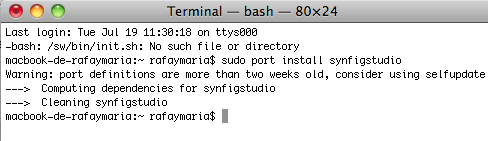
Synfig 0.62.02 remains installed. How can I install 0.63?
Thanks.
[Next page](https://forums.synfig.org/t/install-synfig-on-mac-using-macport/1449.md?page=2)