# How to build Synfig in Ubuntu Intrepid 8.10
**URL:** https://forums.synfig.org/t/how-to-build-synfig-in-ubuntu-intrepid-8-10/299
**Category:** Building synfig
**Created:** [November 9, 2008, 8:29am UTC](https://forums.synfig.org/t/how-to-build-synfig-in-ubuntu-intrepid-8-10/299 "2008-11-09T08:29:25Z")
**Posts on this page:** 20
**Page:** 2
### Author:  [@Coolname007](https://forums.synfig.org/u/Coolname007)
#### Post date: [November 16, 2008, 5:19am UTC](https://forums.synfig.org/t/how-to-build-synfig-in-ubuntu-intrepid-8-10/299/21 "2008-11-16T05:19:27Z")
Ok, Genete. 😃 i’ve finally got synfig successfully built and installed on Ubuntu 8.10, thanks to your help, and i just want to say that i am very very sorry for all the trouble i’ve been causing you. I understand and appreciate the sacrifice you made to help me out. 🙂
Again, THANKS, and my sincere apology for all the things i might have posted here in the forum, or in the synfig chat room, that may have upset you… 😊
Much appreciation,
Coolname007
---
### Author:  [@Genete](https://forums.synfig.org/u/Genete)
#### Post date: [November 16, 2008, 8:49am UTC](https://forums.synfig.org/t/how-to-build-synfig-in-ubuntu-intrepid-8-10/299/22 "2008-11-16T08:49:59Z")
I’m not upset at all. Nothing, zero, “nada”. Don’t worry. It was only that it was too late to me and I was very tired.
You’re welcome.
-G
---
### Author:  [@Coolname007](https://forums.synfig.org/u/Coolname007)
#### Post date: [November 16, 2008, 9:02pm UTC](https://forums.synfig.org/t/how-to-build-synfig-in-ubuntu-intrepid-8-10/299/23 "2008-11-16T21:02:41Z")
> [@Genete](#):
>
> I’m not upset at all. Nothing, zero, “nada”. Don’t worry. It was only that it was too late to me and I was very tired.
> You’re welcome.
> -G
ok…good. You had me worried for a while there, you know… 😉 and thanks again!! 
Much appreciation, Genete! 😃
---
### Author:  [@Sapnix](https://forums.synfig.org/u/Sapnix)
#### Post date: [November 23, 2008, 1:33pm UTC](https://forums.synfig.org/t/how-to-build-synfig-in-ubuntu-intrepid-8-10/299/24 "2008-11-23T13:33:48Z")
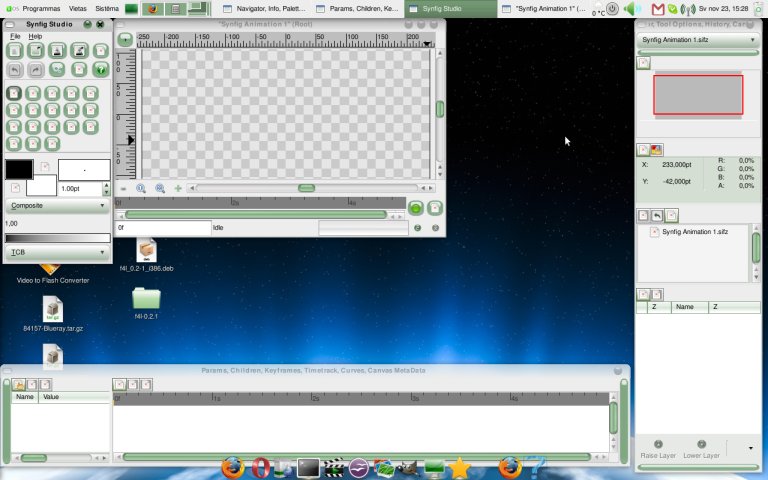
Everything went just fine, only after trying run it, It loaded without splash screen and any icons ;(
Terminal says something like this:
> [@](#):
>
> (synfigstudio:17679): Gtk-WARNING \*\*: Error loading icon: Failed to open file ‘/usr/local/share/pixmaps/synfigstudio/valuenode\_icon.png’: No such file or directory
---
### Author:  [@Genete](https://forums.synfig.org/u/Genete)
#### Post date: [November 24, 2008, 6:03am UTC](https://forums.synfig.org/t/how-to-build-synfig-in-ubuntu-intrepid-8-10/299/25 "2008-11-24T06:03:35Z")
Hii Sapnix,
Is that Ubuntu 8.10? It looks like other llinux distribution.
The reason for missing icons maybe the order you build etl, synfig & synfigstudio and or that you have an old (uncompatible) version of synfig installed in your system. If you had an old version of Synfig installed and you build the sources in the wrong order (synfigstudio before synfig) or maybe simply you didn’t remove all the old packages properly, then during synfigstudio building phase, the libraries used to generate the icons from the source files were the wrong ones, leaving errors in icon generation.
Please confirm that you have followed all the steps in the first post (one by one) and also that you’re running a Ubuntu 8.10 version.
If you have other linux distribution you should follow just the general build instructions. These ones are specific for Ubuntu as explained in the first post.
-G
---
### Author:  [@Radical3](https://forums.synfig.org/u/Radical3)
#### Post date: [November 27, 2008, 12:24pm UTC](https://forums.synfig.org/t/how-to-build-synfig-in-ubuntu-intrepid-8-10/299/26 "2008-11-27T12:24:26Z")
Thanks Genete, worked like a charm.
and its really stable this time round, do i still need to run synfigstudio on one cpu? (taskset -c 0 synfigstudio)
btw i signed up just to congratulate the fantastic release. hope to start posting (and stop lurking around stealing tips and tricks)
Well Done , i wish i could reach in through a TCP/IP packet and give you a well deserved pat on the back.
---
### Author:  [@Genete](https://forums.synfig.org/u/Genete)
#### Post date: [November 27, 2008, 2:54pm UTC](https://forums.synfig.org/t/how-to-build-synfig-in-ubuntu-intrepid-8-10/299/27 "2008-11-27T14:54:52Z")
> [@Radical3](#):
>
> Thanks Genete, worked like a charm.
>
> and its really stable this time round, do i still need to run synfigstudio on one cpu? (taskset -c 0 synfigstudio)
>
> btw i signed up just to congratulate the fantastic release. hope to start posting (and stop lurking around stealing tips and tricks)
>
> Well Done , i wish i could reach in through a TCP/IP packet and give you a well deserved pat on the back.
I’m the last guy in this project. Give thanks to darco (original developer) and mainly to dooglus (current one) who has increased its stability quite a lot since he started to work on this.
I have a quad core and never have run synfigtudio in one single CPU (never have run taskset command). It works very well on linux.
I’ve already received that TCP/IP packet! Thanks! 😉
Welcome to synfig.
-G
---
### Author:  [@emi](https://forums.synfig.org/u/emi)
#### Post date: [December 1, 2008, 9:08pm UTC](https://forums.synfig.org/t/how-to-build-synfig-in-ubuntu-intrepid-8-10/299/28 "2008-12-01T21:08:38Z")
ciao guys, so, i have ubuntu 8.10 on an asus eeepc 900
i have installed synfig as shown on the guide, and it’s working (it seems)
but i have the problem of the no bootsplash and no icons
so, what can i do? GENETEEEEEEEE!!!
no, ok, i previously tried to install the program via synaptic, but didn’t work
and i followed the instructions like they were written,
so at the beginning i uninstalled those previous versions,
but maybe it could make an error? i don’t know, i’m quite a piece of noob on linux and so
ok the question: how can i uninstall the current version?
not synaptic neither terminal with the mentioned option for uninstalling the older versions is doing anything, so i don’t know, i would like to retry to install after a complete clean
bueno genete te mando un fuerte abrazo en espanol, que yo ando desde hace algun tiempo por italia
y se echa de menos, pero ya te digo si se echa de menos…
y sobre todo muchisimas gracias por hacernos la vida POSIBLE a la gente como yo que no llegamos a cierto nivel pero no queremos renunciar a tener ese programa que tanto nos gusta… thanks
---
### Author:  [@Genete](https://forums.synfig.org/u/Genete)
#### Post date: [December 1, 2008, 10:09pm UTC](https://forums.synfig.org/t/how-to-build-synfig-in-ubuntu-intrepid-8-10/299/29 "2008-12-01T22:09:51Z")
Hi emi, welcome to synfig world.
> [@](#):
>
> so at the beginning i uninstalled those previous versions,
what did you do exactly?
Can you paste what does
`
$sudo apt-get remove libsynfig0
` return?
Everything seems that you have compiled synfigstudio using an old version of synfig or its libraries. You have to rebuild being completely sure that you haven’t older synfig versions installed.
To know if synfig or any of its libraries are installed do a search of packages in synaptics and unistall everything that smells to synfig. After that you have to rebuild everything again. Maybe it is just needed synfigstudio but I want to be sure you have followed all the steps. Build ETL, synfig and synfigstudio. In that order.
Good luck
-G
Suerte! 😉
---
### Author:  [@emi](https://forums.synfig.org/u/emi)
#### Post date: [December 3, 2008, 9:08am UTC](https://forums.synfig.org/t/how-to-build-synfig-in-ubuntu-intrepid-8-10/299/30 "2008-12-03T09:08:33Z")
so, ciao, thanks for fast support!!!
so i used your commands for uninstalling
$sudo apt-get remove libsynfig0
but it said no existing application, so didn’t remove anything
but wait
after a while i started to get messages of no free space on device again,
trying to do many different actions, but i was so confused because even
with no space (as it said) i could install new applications and they were working
ok, so, i told you i have the eeepc900 that means 4giga partition and the system was there
f\*\*k not a lot really? so after some more software download
the day after i switch off before going working and the afternoon when i come back
the computer does not start any more: no free space disk available
and the installing the os via usb does not work
(around 50 percent of the copying the files there is an error and stops)
like it worked just two days before, so now i am a little in the \*\*\*\*\*\*\*\*\*\*\*
\*\*\*\*\*\*\*\*\*\* shit now
i will try to see if i can do something…
and after will try to install synfig again
just one thing, i am sure i followed the guide as it was written, including
installation order, but now we know the problem is something wrong with
my computer
so, thanks again and again and i will come back stronger with a working unit!!!
last thing: some suggested another os?
muchas gracias de nuevo y hasta pronto
---
### Author:  [@JorgeM93](https://forums.synfig.org/u/JorgeM93)
#### Post date: [December 18, 2008, 4:11pm UTC](https://forums.synfig.org/t/how-to-build-synfig-in-ubuntu-intrepid-8-10/299/31 "2008-12-18T16:11:05Z")
OK, I think we are around three people with the same problem: No icons or spalsh screen when synfigstudio is launched.
I have Ubuntu 8.10 Intrepid Ibex installed (via wubi) with 20GB of space in a HP Compaq dx2290 MT.
While doing
`make
sudo make install` it says that there’s a problem with a directory. At the end of the installation of synfigstudio says this
`Making install in images
make[1]: se ingresa al directorio `/home/jorge/Escritorio/synfigstudio-0.61.09/images'
mkdir 128x128
mkdir: no se puede crear el directorio «128x128»: El fichero ya existe
make[1]: [128x128/synfig_icon.png] Error 1 (no tiene efecto)
synfig -q synfig_icon.sif -o 128x128/synfig_icon.png --time 0 -w 128 -h 128
synfig: error while loading shared libraries: libsynfig.so.0: cannot open shared object file: No such file or directory
make[1]: *** [128x128/synfig_icon.png] Error 127
make[1]: se sale del directorio `/home/jorge/Escritorio/synfigstudio-0.61.09/images'
make: *** [install-recursive] Error 1
`
So when I did sudo ldconfig and then synfigstudio
I just see this:
[code]jorge@ubuntu:~/Escritorio/synfigstudio-0.61.09$ synfigstudio
synfig studio – starting up application…
synfig(13703) [10:35:09] warning: Unable to open /usr/local/share/pixmaps/synfigstudio/synfig\_icon.png
(synfigstudio:13703): Gtk-WARNING \*\*: Error loading icon: Failed to open file ‘/usr/local/share/pixmaps/synfigstudio/bool\_icon.png’: No existe el fichero ó directorio
(synfigstudio:13703): Gtk-WARNING \*\*: Error loading icon: Failed to open file ‘/usr/local/share/pixmaps/synfigstudio/integer\_icon.png’: No existe el fichero ó directorio
(synfigstudio:13703): Gtk-WARNING \*\*: Error loading icon: Failed to open file ‘/usr/local/share/pixmaps/synfigstudio/angle\_icon.png’: No existe el fichero ó directorio
(synfigstudio:13703): Gtk-WARNING \*\*: Error loading icon: Failed to open file ‘/usr/local/share/pixmaps/synfigstudio/time\_icon.png’: No existe el fichero ó directorio
(synfigstudio:13703): Gtk-WARNING \*\*: Error loading icon: Failed to open file ‘/usr/local/share/pixmaps/synfigstudio/real\_icon.png’: No existe el fichero ó directorio
(synfigstudio:13703): Gtk-WARNING \*\*: Error loading icon: Failed to open file ‘/usr/local/share/pixmaps/synfigstudio/vector\_icon.png’: No existe el fichero ó directorio
(synfigstudio:13703): Gtk-WARNING \*\*: Error loading icon: Failed to open file ‘/usr/local/share/pixmaps/synfigstudio/color\_icon.png’: No existe el fichero ó directorio
(synfigstudio:13703): Gtk-WARNING \*\*: Error loading icon: Failed to open file ‘/usr/local/share/pixmaps/synfigstudio/segment\_icon.png’: No existe el fichero ó directorio
(synfigstudio:13703): Gtk-WARNING \*\*: Error loading icon: Failed to open file ‘/usr/local/share/pixmaps/synfigstudio/blinepoint\_icon.png’: No existe el fichero ó directorio
(synfigstudio:13703): Gtk-WARNING \*\*: Error loading icon: Failed to open file ‘/usr/local/share/pixmaps/synfigstudio/list\_icon.png’: No existe el fichero ó directorio
(synfigstudio:13703): Gtk-WARNING \*\*: Error loading icon: Failed to open file ‘/usr/local/share/pixmaps/synfigstudio/canvas\_pointer\_icon.png’: No existe el fichero ó directorio
(synfigstudio:13703): Gtk-WARNING \*\*: Error loading icon: Failed to open file ‘/usr/local/share/pixmaps/synfigstudio/string\_icon.png’: No existe el fichero ó directorio
(synfigstudio:13703): Gtk-WARNING \*\*: Error loading icon: Failed to open file ‘/usr/local/share/pixmaps/synfigstudio/gradient\_icon.png’: No existe el fichero ó directorio
(synfigstudio:13703): Gtk-CRITICAL \*\*: gtk\_image\_get\_pixbuf: assertion `image-\>storage\_type == GTK\_IMAGE\_PIXBUF || image-\>storage\_type == GTK\_IMAGE\_EMPTY’ failed
synfig(13703) [10:35:09] warning: Unable to open /usr/local/share/pixmaps/synfigstudio/synfig\_icon.png
(synfigstudio:13703): Gtk-CRITICAL \*\*: gtk\_image\_get\_pixbuf: assertion `image-\>storage\_type == GTK\_IMAGE\_PIXBUF || image-\>storage\_type == GTK\_IMAGE\_EMPTY’ failed
synfig(13703) [10:35:11] información: Created directory “/home/jorge/.synfig/tmp”
(synfigstudio:13703): Gtk-WARNING \*\*: Error loading icon: Failed to open file ‘/usr/local/share/pixmaps/synfigstudio/duplicate\_icon.png’: No existe el fichero ó directorio
(synfigstudio:13703): Gtk-WARNING \*\*: Error loading icon: Failed to open file ‘/usr/local/share/pixmaps/synfigstudio/children\_icon.png’: No existe el fichero ó directorio
(synfigstudio:13703): Gtk-WARNING \*\*: Error loading icon: Failed to open file ‘/usr/local/share/pixmaps/synfigstudio/keyframe\_icon.png’: No existe el fichero ó directorio
(synfigstudio:13703): Gtk-WARNING \*\*: Error loading icon: Failed to open file ‘/usr/local/share/pixmaps/synfigstudio/time\_track\_icon.png’: No existe el fichero ó directorio
(synfigstudio:13703): Gtk-WARNING \*\*: Error loading icon: Failed to open file ‘/usr/local/share/pixmaps/synfigstudio/curves\_icon.png’: No existe el fichero ó directorio
(synfigstudio:13703): Gtk-WARNING \*\*: Error loading icon: Failed to open file ‘/usr/local/share/pixmaps/synfigstudio/meta\_data\_icon.png’: No existe el fichero ó directorio
(synfigstudio:13703): Gtk-WARNING \*\*: Error loading icon: Failed to open file ‘/usr/local/share/pixmaps/synfigstudio/navigator\_icon.png’: No existe el fichero ó directorio
(synfigstudio:13703): Gtk-WARNING \*\*: Error loading icon: Failed to open file ‘/usr/local/share/pixmaps/synfigstudio/info\_icon.png’: No existe el fichero ó directorio
(synfigstudio:13703): Gtk-WARNING \*\*: Error loading icon: Failed to open file ‘/usr/local/share/pixmaps/synfigstudio/clear\_undo\_icon.png’: No existe el fichero ó directorio
(synfigstudio:13703): Gtk-WARNING \*\*: Error loading icon: Failed to open file ‘/usr/local/share/pixmaps/synfigstudio/clear\_redo\_icon.png’: No existe el fichero ó directorio
(synfigstudio:13703): Gtk-WARNING \*\*: Error loading icon: Failed to open file ‘/usr/local/share/pixmaps/synfigstudio/normal\_icon.png’: No existe el fichero ó directorio
(synfigstudio:13703): Gtk-WARNING \*\*: Error loading icon: Failed to open file ‘/usr/local/share/pixmaps/synfigstudio/canvas\_icon.png’: No existe el fichero ó directorio
(synfigstudio:13703): Gtk-WARNING \*\*: Error loading icon: Failed to open file ‘/usr/local/share/pixmaps/synfigstudio/encapsulate\_icon.png’: No existe el fichero ó directorio
(synfigstudio:13703): Gtk-WARNING \*\*: Error loading icon: Failed to open file ‘/usr/local/share/pixmaps/synfigstudio/select\_all\_child\_layers\_icon.png’: No existe el fichero ó directorio
(synfigstudio:13703): Gtk-WARNING \*\*: Error loading icon: Failed to open file ‘/usr/local/share/pixmaps/synfigstudio/layer\_icon.png’: No existe el fichero ó directorio
(synfigstudio:13703): Gtk-WARNING \*\*: Error loading icon: Failed to open file ‘/usr/local/share/pixmaps/synfigstudio/group\_icon.png’: No existe el fichero ó directorio
(synfigstudio:13703): Gtk-WARNING \*\*: Error loading icon: Failed to open file ‘/usr/local/share/pixmaps/synfigstudio/valuenode\_icon.png’: No existe el fichero ó directorio
(synfigstudio:13703): Gtk-WARNING \*\*: Error loading icon: Failed to open file ‘/usr/local/share/pixmaps/synfigstudio/keyframe\_lock\_all.png’: No existe el fichero ó directorio
(synfigstudio:13703): Gtk-WARNING \*\*: Error loading icon: Failed to open file ‘/usr/local/share/pixmaps/synfigstudio/reset\_colors\_icon.png’: No existe el fichero ó directorio
(synfigstudio:13703): Gtk-WARNING \*\*: Error loading icon: Failed to open file ‘/usr/local/share/pixmaps/synfigstudio/swap\_colors\_icon.png’: No existe el fichero ó directorio
(synfigstudio:13703): Gtk-WARNING \*\*: Error loading icon: Failed to open file ‘/usr/local/share/pixmaps/synfigstudio/width\_icon.png’: No existe el fichero ó directorio
(synfigstudio:13703): Gtk-WARNING \*\*: Error loading icon: Failed to open file ‘/usr/local/share/pixmaps/synfigstudio/sketch\_icon.png’: No existe el fichero ó directorio
(synfigstudio:13703): Gtk-WARNING \*\*: Error loading icon: Failed to open file ‘/usr/local/share/pixmaps/synfigstudio/draw\_icon.png’: No existe el fichero ó directorio
(synfigstudio:13703): Gtk-WARNING \*\*: Error loading icon: Failed to open file ‘/usr/local/share/pixmaps/synfigstudio/zoom\_icon.png’: No existe el fichero ó directorio
(synfigstudio:13703): Gtk-WARNING \*\*: Error loading icon: Failed to open file ‘/usr/local/share/pixmaps/synfigstudio/eyedrop\_icon.png’: No existe el fichero ó directorio
(synfigstudio:13703): Gtk-WARNING \*\*: Error loading icon: Failed to open file ‘/usr/local/share/pixmaps/synfigstudio/fill\_icon.png’: No existe el fichero ó directorio
(synfigstudio:13703): Gtk-WARNING \*\*: Error loading icon: Failed to open file ‘/usr/local/share/pixmaps/synfigstudio/text\_icon.png’: No existe el fichero ó directorio
(synfigstudio:13703): Gtk-WARNING \*\*: Error loading icon: Failed to open file ‘/usr/local/share/pixmaps/synfigstudio/bline\_icon.png’: No existe el fichero ó directorio
(synfigstudio:13703): Gtk-WARNING \*\*: Error loading icon: Failed to open file ‘/usr/local/share/pixmaps/synfigstudio/polyline\_icon.png’: No existe el fichero ó directorio
(synfigstudio:13703): Gtk-WARNING \*\*: Error loading icon: Failed to open file ‘/usr/local/share/pixmaps/synfigstudio/star\_icon.png’: No existe el fichero ó directorio
(synfigstudio:13703): Gtk-WARNING \*\*: Error loading icon: Failed to open file ‘/usr/local/share/pixmaps/synfigstudio/rectangle\_icon.png’: No existe el fichero ó directorio
(synfigstudio:13703): Gtk-WARNING \*\*: Error loading icon: Failed to open file ‘/usr/local/share/pixmaps/synfigstudio/circle\_icon.png’: No existe el fichero ó directorio
(synfigstudio:13703): Gtk-WARNING \*\*: Error loading icon: Failed to open file ‘/usr/local/share/pixmaps/synfigstudio/mirror\_icon.png’: No existe el fichero ó directorio
(synfigstudio:13703): Gtk-WARNING \*\*: Error loading icon: Failed to open file ‘/usr/local/share/pixmaps/synfigstudio/rotate\_icon.png’: No existe el fichero ó directorio
(synfigstudio:13703): Gtk-WARNING \*\*: Error loading icon: Failed to open file ‘/usr/local/share/pixmaps/synfigstudio/scale\_icon.png’: No existe el fichero ó directorio
(synfigstudio:13703): Gtk-WARNING \*\*: Error loading icon: Failed to open file ‘/usr/local/share/pixmaps/synfigstudio/smooth\_move\_icon.png’: No existe el fichero ó directorio
(synfigstudio:13703): Gtk-WARNING \*\*: Error loading icon: Failed to open file ‘/usr/local/share/pixmaps/synfigstudio/about\_icon.png’: No existe el fichero ó directorio
(synfigstudio:13703): Gtk-WARNING \*\*: Error loading icon: Failed to open file ‘/usr/local/share/pixmaps/synfigstudio/saveall\_icon.png’: No existe el fichero ó directorio
[/code]
And it happens the same of someone who published an image earlier which shows synfig without icons
So I went to the directory in my desktop where I untarred the Synfigstudio package and for my surprise I went to the directory that said “Images” then “128x128” and I found NOTHING there
Is that package damaged or just not complete?
I would be glad for getting an answer as earlier as you can because I can’t connect my Ubuntu PC everyday (in order to be online I have to transport my CPU to other room
God Bless You
PD: sorry for my LONG post, I’m just trying to give you all the clues possible.
---
### Author:  [@Genete](https://forums.synfig.org/u/Genete)
#### Post date: [December 18, 2008, 8:52pm UTC](https://forums.synfig.org/t/how-to-build-synfig-in-ubuntu-intrepid-8-10/299/32 "2008-12-18T20:52:36Z")
```auto
synfig: error while loading shared libraries: libsynfig.so.0: cannot open shared object file: No such file or directory
```
That means that you didn’t installed synfig-core successfully. Try to start it over with a clean folder and installation. Be sure you strictly follow all the steps and that you don’t get any error from the synfig-core install.
Maybe that the environment variables in wubi is not prepared for the build instructions I gave so you need to tell it how to find the libraries during synfigstudio building. The images are rendered by the synfig libraries during synfig-studio build so if they are not found you cannot render them.
After install synfig-core, try to type this in a terminal: “type synfig” (without quotes)
it should return the path to the synfig binary. It would give you a clue on what’s happening.
It is very weird that some people can install it with the same instructions and some not. I don’t have wubi so I cannot test it to confirm what’s happening.
Good luck
-G
---
### Author:  [@ToshibaWarrior](https://forums.synfig.org/u/ToshibaWarrior)
#### Post date: [December 18, 2008, 9:27pm UTC](https://forums.synfig.org/t/how-to-build-synfig-in-ubuntu-intrepid-8-10/299/33 "2008-12-18T21:27:52Z")
Hello! First of all, thanks for such a cool program! But I have the exact same problem as JorgeM93…
And I really don’t want to recompile everything…because i don’t know how…
Is there something that can be done?..
---
### Author:  [@ToshibaWarrior](https://forums.synfig.org/u/ToshibaWarrior)
#### Post date: [December 19, 2008, 12:00am UTC](https://forums.synfig.org/t/how-to-build-synfig-in-ubuntu-intrepid-8-10/299/34 "2008-12-19T00:00:54Z")
Hello again! I manage to fix the problem!
Ok, first, I’m not a complete Linux-noob, but I suck when it comes to compiling stuff…
Ok, I manage to fix those errors by going to Synaptic and searching for “synfig” curiously enough I had a package called “synfig examples” which was installed automatically with Synaptic’s synfigstudio…I completely removed it using synaptic and then opened nautilus with root privileges o a Terminal:
```auto
gksudo nautilus
```
Then navigated to /usr/local/bin and deleted synfigstudio from there and recompiled it following the instructions on this thread (again) and PRESTO! Everything works and all icons and splash screens are there! 😆
I’m very happy with the result!
Thanks again for such a great program!
---
### Author:  [@JorgeM93](https://forums.synfig.org/u/JorgeM93)
#### Post date: [December 19, 2008, 12:34am UTC](https://forums.synfig.org/t/how-to-build-synfig-in-ubuntu-intrepid-8-10/299/35 "2008-12-19T00:34:56Z")
hmm OK, I’ll try it but I was (and actually am) sure that every synfig-related package was not installed because those didn’t appear in synaptic as installed.
So making a small summary what I have to do is to delete the synfig-core and synfigstudio from the /usr/local/bin folder and compile and install them again. 😐 (compiling takes time!) but this time using a clean foder (anywhere?). And finally when synfig core´s is installed I should write “type synfig”
Is it OK?
Is this problem going to be solved in Ubuntu 9.04?. Because, if this gives me some compilig problems I could just wait 'til April or May.
---
### Author:  [@ToshibaWarrior](https://forums.synfig.org/u/ToshibaWarrior)
#### Post date: [December 19, 2008, 12:49am UTC](https://forums.synfig.org/t/how-to-build-synfig-in-ubuntu-intrepid-8-10/299/36 "2008-12-19T00:49:19Z")
> [@JorgeM93](#):
>
> hmm OK, I’ll try it but I was (and actually am) sure that every synfig-related package was not installed because those didn’t appear in synaptic as installed.
>
> So making a small summary what I have to do is to delete the synfig-core and synfigstudio from the /usr/local/bin folder and compile and install them again. 😐 (compiling takes time!) but this time using a clean foder (anywhere?). And finally when synfig core´s is installed I should write “type synfig”
>
> Is it OK?
>
> Is this problem going to be solved in Ubuntu 9.04?. Because, if this gives me some compilig problems I could just wait 'til April or May.
The part about “type synfig” is to check where and if the program is installed. As of everything else, yep, you got it right, or at least that’s how I did it.
As a side note: I made my first animation, using one of the tutorials and I felt so freaking happy! 😒
I used to make animation in Blender, but it’s too comprehensive and rendering takes hours…so this program is exactly what I’ve been needing for months! Simple yet powerful!
And as a status report: everything works smoothly over here in Ubuntu Intrepid (8.10) with all current updates…I’ve tested a few features and so far everything works cool!
I’ll post back if anything arises! 
---
### Author:  [@serp](https://forums.synfig.org/u/serp)
#### Post date: [January 1, 2009, 2:19am UTC](https://forums.synfig.org/t/how-to-build-synfig-in-ubuntu-intrepid-8-10/299/37 "2009-01-01T02:19:16Z")
Hey! 🙂 Just Wanted to say thanks. Synfig was installed on my linux box for a few months now and only now i found detailed instructions how to install it correctly under Intrepid Ibex. Everything worked out fine following the instructions. Cheers 😉
Yeah and Happy New Year 2009
---
### Author:  [@frankclaessen](https://forums.synfig.org/u/frankclaessen)
#### Post date: [January 2, 2009, 5:37am UTC](https://forums.synfig.org/t/how-to-build-synfig-in-ubuntu-intrepid-8-10/299/38 "2009-01-02T05:37:57Z")
Hi all,
Just followed the instructions for building synfigstudio in Intrepid. Up to the point where i have to configure synfigstudio everything goes smooth. However, at configuring Synfigstudtio I receive an error message:
checking for synfig \>= 0.61.09 ETL \>= 0.04.12 sigc+±2.0… configure: error: \*\* Unable to set up dependent libraries (synfig \>= 0.61.09, ETL\>= 0.04.12)
What can I do about this?
TIA for your help
cheers
Frank
---
### Author:  [@frankclaessen](https://forums.synfig.org/u/frankclaessen)
#### Post date: [January 2, 2009, 5:51am UTC](https://forums.synfig.org/t/how-to-build-synfig-in-ubuntu-intrepid-8-10/299/39 "2009-01-02T05:51:50Z")
> [@frankclaessen](#):
>
> Hi all,
>
> Just followed the instructions for building synfigstudio in Intrepid. Up to the point where i have to configure synfigstudio everything goes smooth. However, at configuring Synfigstudtio I receive an error message:
>
> checking for synfig \>= 0.61.09 ETL \>= 0.04.12 sigc+±2.0… configure: error: \*\* Unable to set up dependent libraries (synfig \>= 0.61.09, ETL\>= 0.04.12)
>
> What can I do about this?
>
> TIA for your help
>
> cheers
>
> Frank
Hi all - me again! Sorry! Just found out that i had missed commenting the SUBDIRS line in the config file for synfig.
Retrying the compile process as we speak.
Cheers Frank
---
### Author:  [@lwordish](https://forums.synfig.org/u/lwordish)
#### Post date: [January 2, 2009, 6:14pm UTC](https://forums.synfig.org/t/how-to-build-synfig-in-ubuntu-intrepid-8-10/299/40 "2009-01-02T18:14:59Z")
I followed the instructions and now Synfig Studio works. Thanks for the great help =)
[Previous page](https://forums.synfig.org/t/how-to-build-synfig-in-ubuntu-intrepid-8-10/299.md?page=1)
[Next page](https://forums.synfig.org/t/how-to-build-synfig-in-ubuntu-intrepid-8-10/299.md?page=3)