# How to animate multiple objects easily
**URL:** https://forums.synfig.org/t/how-to-animate-multiple-objects-easily/12134
**Category:** Animation related help
**Created:** [May 7, 2021, 3:47am UTC](https://forums.synfig.org/t/how-to-animate-multiple-objects-easily/12134 "2021-05-07T03:47:41Z")
**Posts on this page:** 10
**Page:** 1
### Author:  [@veermetri05](https://forums.synfig.org/u/veermetri05)
#### Post date: [May 7, 2021, 3:47am UTC](https://forums.synfig.org/t/how-to-animate-multiple-objects-easily/12134/1 "2021-05-07T03:47:41Z")
> [@Animation in Synfig | Micro Animation by me \[project files included\]](https://forums.synfig.org/t/animation-in-synfig-micro-animation-by-me/12092/14):
>
> [mydaynighthouse] [daynighthouse.sifz](https://forums.synfig.org/uploads/short-url/tCc8sCSHUxePFIKLr5QGVY0Qxsz.sifz) (93.3 KB) I liked [this](https://in.pinterest.com/pin/705165254152553878/) animation, so I created it in Synfig. Original Creator: [Bon Matin by Guillaume Kurkdjian on Dribbble](https://dribbble.com/shots/4439092-Bon-Matin) If you want me to create any animation in Synfig you can tell me.
You can see in this above post, that the clouds scale to zero on the Y axis. All the clouds scale down at once. And basically I want to apply same effect to all. I want to know if there is any easy way to do that.
Animating a cloud and duplicating it:
This has limitations like if I want to change the animation later, suppose in the above example rather than scaling them down. I want to create a fade in effect by adjusting the opacity. I would manually have to go to each group and apply that animation.
Using ValueNodes:
Value Nodes provide a better control, all the other clouds can be controlled by one single animation. But if I have exported the value of scale effect and connected it. Again how would I control the opacity if I change my mind later.
I think there must be a way to do this, but I don’t know. If there is a better way to do this let me know. And also if I am missing something.
---
### Author:  [@rodolforg](https://forums.synfig.org/u/rodolforg)
#### Post date: [May 7, 2021, 4:58am UTC](https://forums.synfig.org/t/how-to-animate-multiple-objects-easily/12134/2 "2021-05-07T04:58:35Z")
> [@veermetri05](#):
>
> Value Nodes provide a better control, all the other clouds can be controlled by one single animation. But if I have exported the value of scale effect and connected it. Again how would I control the opacity if I change my mind later.
Exported valuenodes can be animated and have their animation values/timing changed and that will be reflected to every parameter/value connected to them.
---
### Author:  [@veermetri05](https://forums.synfig.org/u/veermetri05)
#### Post date: [May 7, 2021, 11:05am UTC](https://forums.synfig.org/t/how-to-animate-multiple-objects-easily/12134/3 "2021-05-07T11:05:12Z")
@rodolforg
Yeah I already know that but there is no way to link a whole objects all parameters to other objects, or simply have a clone which will be controlled by parent.
---
### Author:  [@Khemardi](https://forums.synfig.org/u/Khemardi)
#### Post date: [May 7, 2021, 2:14pm UTC](https://forums.synfig.org/t/how-to-animate-multiple-objects-easily/12134/4 "2021-05-07T14:14:12Z")
I think you already have the answer, but you may not realize it. Place all the clouds in one folder and then animate the folder, so it will affect all the clouds in the folder. But here’s what I recommend.
In setting up:
Step 1: Place all the clouds into one folder and let’s say using the example you posted, call that folder clouds.
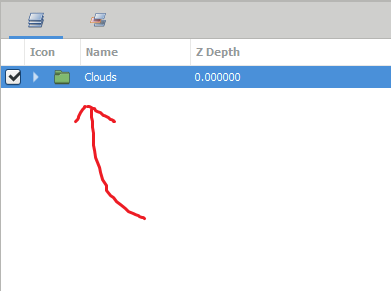
Step 2: Create three different transforms that you’ll use to animate moving, scaling and rotation.
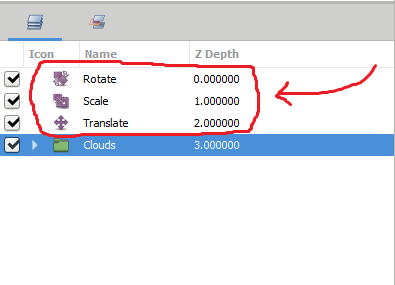
Step 3: Place the clouds folder and all three transforms into one folder, so that the transforms will only affect the clouds.
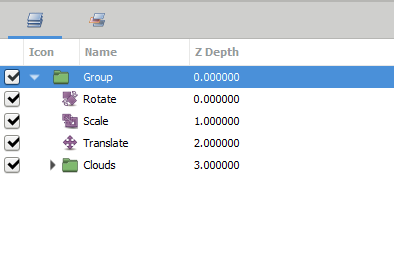
When you want to rotate the clouds add the keyframes to the “Rotate” transform,
When you want to move the clouds add the keyframes to the “Translate” transform and when you want to scale add the keyframes to the “Scale” transform. This will make your animations non-destructive, so if for example, you want to remove the scaling of the clouds completely, simply turn off the “Scale” transform layer. And if you want to alter the opacity of all the clouds, click on the ‘clouds’ folder and go to properties and alter the opacity and it will affect all the clouds.
All that said, you can place the animation on the clouds folder, but it will get complicated when adding keyframes for multiple parameters. Oh one more thing, you can create a control for each of the parameters that you plan on animating and place the keyframes on the controllers themselves, instead of going to the properties all the time and that way you’ll have control over whatever parameter you want whenever you want. I’ll allow you to explore that on your own if you’re interested.
---
### Author:  [@veermetri05](https://forums.synfig.org/u/veermetri05)
#### Post date: [May 7, 2021, 2:37pm UTC](https://forums.synfig.org/t/how-to-animate-multiple-objects-easily/12134/5 "2021-05-07T14:37:40Z")
Thanks for your reply, this will be useful, but that’s not what I want.
As I said before I want to apply this effect to all group/layer. Not to the group/layer.
Let me explain visually.
This is what I actually want every thing to scale down to their independent center.

Vs
What your method gives me.

I think it’s clear now, what I actually needed.
---
### Author:  [@Khemardi](https://forums.synfig.org/u/Khemardi)
#### Post date: [May 7, 2021, 3:46pm UTC](https://forums.synfig.org/t/how-to-animate-multiple-objects-easily/12134/6 "2021-05-07T15:46:18Z")
I understand now. I’ve never thought about doing this before, so I’ll think about it and see if there’s an easy solution
---
### Author:  [@rodolforg](https://forums.synfig.org/u/rodolforg)
#### Post date: [May 7, 2021, 11:44pm UTC](https://forums.synfig.org/t/how-to-animate-multiple-objects-easily/12134/7 "2021-05-07T23:44:39Z")
> [@veermetri05](#):
>
> there is no way to link a whole objects all parameters to other objects,
But you don’t want all parameters, right? In your example, you want scale and/or opacity only.
If you want to link one/some parameters, you can select all layers you need and right-click on a parameter in Parameter Panel and select Link.
When multiple layers are selected, the Parameter Panel only show the parameters the layers share/have in common.
---
### Author:  [@rodolforg](https://forums.synfig.org/u/rodolforg)
#### Post date: [May 7, 2021, 11:45pm UTC](https://forums.synfig.org/t/how-to-animate-multiple-objects-easily/12134/8 "2021-05-07T23:45:30Z")
And, AFAIK, Synfig doesn’t have the concept of ‘instance’ of a ‘library’ item, like Macromedia Flash had.
---
### Author:  [@ktim](https://forums.synfig.org/u/ktim)
#### Post date: [May 15, 2021, 5:17am UTC](https://forums.synfig.org/t/how-to-animate-multiple-objects-easily/12134/9 "2021-05-15T05:17:17Z")
@veermetri05 great work you are doing! have you considered putting these works on your YouTube channel? if so whats the link, if not yet please consider doing so to increase the audience. thanks
---
### Author:  [@timothybushman](https://forums.synfig.org/u/timothybushman)
#### Post date: [June 16, 2021, 6:52pm UTC](https://forums.synfig.org/t/how-to-animate-multiple-objects-easily/12134/10 "2021-06-16T18:52:16Z")
It is a very interesting and useful discussion at least for me, [😉](https://scholarsintel.com) and I hope it will be useful to other people. Thanks!