# \[GSoC 2025\] Brush Tool Project
**URL:** https://forums.synfig.org/t/gsoc-2025-brush-tool-project/16478
**Category:** Development
**Tags:** gsoc2025
**Created:** [May 9, 2025, 5:50pm UTC](https://forums.synfig.org/t/gsoc-2025-brush-tool-project/16478 "2025-05-09T17:50:54Z")
**Posts on this page:** 20
**Page:** 1
### Author:  [@Abdelhadi\_Wael](https://forums.synfig.org/u/Abdelhadi_Wael)
#### Post date: [May 9, 2025, 5:50pm UTC](https://forums.synfig.org/t/gsoc-2025-brush-tool-project/16478/1 "2025-05-09T17:50:54Z")
Hi everyone,
I’m **Abdelhadi** , a computer engineering student from Egypt, and I’m really excited to be working with the Synfig community this summer through **Google Summer of Code 2025**! under the mentorship of **@mohamed.Adhamc**
Many of you know that Synfig had a brush tool before, but it had problems—it was slow, the strokes didn’t look good, and undoing actions didn’t always work right. My project aims to build a brand new, reliable brush tool for smooth and powerful drawing.
**Project Goals :**
- **Smooth Drawing and Erasing** :
The new overlay preview system shows strokes instantly as you draw or erase, using a fast offscreen buffer instead of updating the layer in real time. This avoids lag, improves stroke quality, and ensures smooth results. Final rendering happens only after the stroke ends.
- **Reliable & Flexible Undo/Redo** :
Each stroke is a single undoable action. Users can choose between three undo modes— **pixel buffer** (faster, higher memory), **re-render** (lower memory, slower), or **checkpointing** (a mix of both)—depending on their performance and resource needs.
- **Customizable Brushes:** A new Brush Profile Editor will allow you to create, tweak (size, opacity, hardness, spacing, etc.), and manage your brush presets.
Your feedback, ideas, and help are more than welcome as the project moves forward.
Lastly, I will use this thread to keep you all updated on my progress once I start working on this project full-time in July.
If you have any questions, feel free to also ask them in this thread

---
### Author:  [@Khemardi](https://forums.synfig.org/u/Khemardi)
#### Post date: [May 10, 2025, 1:50am UTC](https://forums.synfig.org/t/gsoc-2025-brush-tool-project/16478/2 "2025-05-10T01:50:25Z")
Looking forward to an improved brush tool. Good luck !
---
### Author:  [@Archer](https://forums.synfig.org/u/Archer)
#### Post date: [May 10, 2025, 2:04am UTC](https://forums.synfig.org/t/gsoc-2025-brush-tool-project/16478/3 "2025-05-10T02:04:24Z")
Hello
@abdelhadi.wael
Personally, I would like there to be a brush tool, but vector. At least that, you could choose between Raster brush and vector brush. I consider that there are already very mature tools such as Krita and Gimp that do their work with bits map images very well. After more than a decade of using Synfig, I believe that what is needed more in this aspect of the brushes, is a vector tool that is light. I have proposed a request for a function for this issue for a long time [FEATURE REQUEST: VECTOR BRUSHES · Issue #678 · synfig/synfig · GitHub](https://github.com/synfig/synfig/issues/678).
Anyway, I appreciate your collaboration very much.
Thank you very much for helping to improve Synfig 😃.
---
### Author:  [@Majkel](https://forums.synfig.org/u/Majkel)
#### Post date: [May 10, 2025, 5:37pm UTC](https://forums.synfig.org/t/gsoc-2025-brush-tool-project/16478/4 "2025-05-10T17:37:42Z")
Hi,
would it be manageable to have brush work with animation mode? Something like frame by frame animation to sketch out project
---
### Author:  [@Abdelhadi\_Wael](https://forums.synfig.org/u/Abdelhadi_Wael)
#### Post date: [May 10, 2025, 7:17pm UTC](https://forums.synfig.org/t/gsoc-2025-brush-tool-project/16478/5 "2025-05-10T19:17:21Z")
Thank you 😄
---
### Author:  [@Abdelhadi\_Wael](https://forums.synfig.org/u/Abdelhadi_Wael)
#### Post date: [May 10, 2025, 7:42pm UTC](https://forums.synfig.org/t/gsoc-2025-brush-tool-project/16478/6 "2025-05-10T19:42:03Z")
Hi @Archer
Wow, over a decade with Synfig—that’s impressive! Thanks for sharing your perspective.
> [@Archer](#):
>
> Personally, I would like there to be a brush tool, but vector.
I completely understand your preference for a vector brush tool, especially given Synfig’s strengths as a vector animation platform.
> [@Archer](#):
>
> there are already very mature tools such as Krita and Gimp
tools like Krita and GIMP are indeed excellent for raster workflows, this project addresses community need for integrated raster drawing capabilities. This will allow artists to seamlessly add hand-drawn details, texture overlays, or frame-by-frame corrections within Synfig, without needing to switch between applications (a common pain point for artists).
I agree your suggestion for a vector brush tool, I think it would be a powerful addition.
I suggest you consider proposing the idea next year for GSoC 2026—it’s a fantastic opportunity to bring this idea to life.
---
### Author:  [@Abdelhadi\_Wael](https://forums.synfig.org/u/Abdelhadi_Wael)
#### Post date: [May 10, 2025, 7:47pm UTC](https://forums.synfig.org/t/gsoc-2025-brush-tool-project/16478/7 "2025-05-10T19:47:12Z")
Yes , that is one of the project goals
---
### Author:  [@Archer](https://forums.synfig.org/u/Archer)
#### Post date: [May 10, 2025, 11:30pm UTC](https://forums.synfig.org/t/gsoc-2025-brush-tool-project/16478/8 "2025-05-10T23:30:49Z")
Hello. Thank you very much for answering Abdelhadi.
You’re right about fixing frame by frame, I’ve had to do it many times. But the problem that arises from doing it frame by frame with raster images is the following: Synfig Studio is a software that offers one of the easiest ways to export to any resolution, even if from the beginning we work with a very small canvas size, we can export to a larger resolution without any complications, This is thanks to vector graphics. Exporting at a higher resolution, vector graphics scale smoothly, but the thing about bitmaps is that you see more of their pixels and their decoupling in quality.
In a previous version of Synfig they added a formidable and very useful feature, which is that if you import an image into Synfig and it is being edited with an external tool such as Krita, saving to Krita will update the raster image in the Synfig workspace. This feature has been very useful for animations where I use raster image sequences in Synfig.
What I humbly propose is to orient this form of drawing and erasing, in addition to being able to easily draw on the same layer frame by frame, towards the creation of vector graphics. I think it would be the best thing for Synfig.
It is with all the good intentions. Please don’t take it the wrong way. I sincerely respect your talent and vocation as a software developer, and I know how difficult it is to bring the idea to reality.
As I said before, thank you so much for helping to improve Synfig Studio 😁.
---
### Author:  [@Svarov](https://forums.synfig.org/u/Svarov)
#### Post date: [May 11, 2025, 7:05am UTC](https://forums.synfig.org/t/gsoc-2025-brush-tool-project/16478/9 "2025-05-11T07:05:33Z")
Hey,
Congrats on being accepted for GSoC.
I am a little bit divided on the feature though, but it’s of course just my opinion. The thing I am afraid of is Synfig becoming an unmanageable feature creep instead of vector animation suite where on paper we have a ton of features and yet none of them work particularly well. Given the number of active members/developers it does bother me a bit.
Yeah, the basic raster support is a must but concentrating on it over vector functionality seems a bit wrong. I usually just use Pencil2D if I need to manually correct a bunch of frames. I definitely support @Archer here and would like to see more features oriented to ease creation of vector graphics, you know, something Synfig was originally designed for.
---
### Author:  [@Abdelhadi\_Wael](https://forums.synfig.org/u/Abdelhadi_Wael)
#### Post date: [May 11, 2025, 9:12pm UTC](https://forums.synfig.org/t/gsoc-2025-brush-tool-project/16478/10 "2025-05-11T21:12:54Z")
Thank you both for the feedback — it really helps me better understand the community’s perspective.
I see the importance of focusing on vector tools, and improving frame-by-frame with vectors definitely sounds great. But honestly, I’m not in a position to decide on something that could influence Synfig’s direction or the scope of this project.
@mohamed.Adhamc @ice0 @rodolforg @BobSynfig — could you please share your thoughts on this?
---
### Author:  [@mohamed.Adhamc](https://forums.synfig.org/u/mohamed.Adhamc)
#### Post date: [May 12, 2025, 12:45pm UTC](https://forums.synfig.org/t/gsoc-2025-brush-tool-project/16478/11 "2025-05-12T12:45:25Z")
Hey everyone,
My personal opinion here is that we need to tackle things step-by-step in an iterative approach.
Currently, the brush tool AFAIK doesn’t work. Having it be fixed could only be helpful since some users could/do use it.
After that is done -whether there would be time in this project or maybe as future work- a “vector mode” could be added to the brush tool and then users would be able to switch between the modes and use what they need. Or perhaps it could be made as a separate “vector brush tool” altogether.
---
### Author:  [@rodolforg](https://forums.synfig.org/u/rodolforg)
#### Post date: [May 12, 2025, 10:33pm UTC](https://forums.synfig.org/t/gsoc-2025-brush-tool-project/16478/12 "2025-05-12T22:33:19Z")
I can see some of you want a vector brush, but the idea proposed by us (particularly me in GSoC idea list), the project proposed by Wael and the approved by us was a bitmap brush.
There is some initial but broken implementation in Synfig. You can even see stuff about it in the “default values” panel below the Tools panel: The brush size chooser (at right in picture below)
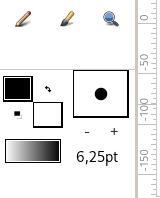
It is easier and safer to implement - and yes, useful. We can’t forget it is lighter for processor resources too…
We could implement vector brush later when things are settled 😉
About Vector brush, there is an old trick described in the wiki, by using Duplicate layer:
> **[Doc:Brushes - Synfig Animation Studio](https://wiki.synfig.org/Doc:Brushes)**
PS: maybe we could use a trick to compensate the absence of vector brush: usage of mipmapping…
---
### Author:  [@Svarov](https://forums.synfig.org/u/Svarov)
#### Post date: [May 13, 2025, 4:06am UTC](https://forums.synfig.org/t/gsoc-2025-brush-tool-project/16478/13 "2025-05-13T04:06:22Z")
> [@mohamed.Adhamc](#):
>
> Currently, the brush tool AFAIK doesn’t work. Having it be fixed could only be helpful since some users could/do use it.
Yes, I have to agree. I would make an argument that it shouldn’t exist in the first place, but now that we have it, we basically have only 2 choices: either improve it or delete it. And deleting functionality rarely make users happy…
> [@rodolforg](#):
>
> About Vector brush, there is an old trick described in the wiki, by using Duplicate layer:
Thanks, for the link, I never thought about using Duplicate layer in this way. Certainly something for me to play with in the future, but I would guess it would work pretty slow to be actually useful as a brush substitute (not to mention the lack of pressure and other things you expect from a brush).
---
### Author:  [@Archer](https://forums.synfig.org/u/Archer)
#### Post date: [May 13, 2025, 5:07am UTC](https://forums.synfig.org/t/gsoc-2025-brush-tool-project/16478/14 "2025-05-13T05:07:22Z")
What I’d like for Synfig Studio, in my opinion, is a tool like grease pencil in Blender (You can draw and erase, like when we do it in Krita or Gimp, but it’s all made of vectors). For some reason, grease pencil is more optimized for frame-by-frame, it’s kind of tricky to do interpolation animation, at least as far as I’ve explored.
As for the trick described in the wiki, using mipmapping, it would not be a bad idea to make it more accessible to the artist, simply selecting a brush within the options of the spline and draw tools. In my opinion it would be a good and useful feature 😁.
---
### Author:  [@Abdelhadi\_Wael](https://forums.synfig.org/u/Abdelhadi_Wael)
#### Post date: [June 23, 2025, 8:38pm UTC](https://forums.synfig.org/t/gsoc-2025-brush-tool-project/16478/15 "2025-06-23T20:38:48Z")
**Update:** Code progress can be followed [here](https://github.com/synfig/synfig/pull/3605).
---
### Author:  [@Abdelhadi\_Wael](https://forums.synfig.org/u/Abdelhadi_Wael)
#### Post date: [June 23, 2025, 8:42pm UTC](https://forums.synfig.org/t/gsoc-2025-brush-tool-project/16478/16 "2025-06-23T20:42:02Z")
### **Weekly Progress Update: Week 1 (15–22 June)**
**what i did :**
- Implemented the logic for creating and managing the overlay buffer for the Brush tool.
- When the mouse is pressed, a surface is created, and passed to the overlay renderer.
- The overlay renderer composites this buffer onto the canvas (to make it visible on the screen)
---
### Author:  [@Abdelhadi\_Wael](https://forums.synfig.org/u/Abdelhadi_Wael)
#### Post date: [June 30, 2025, 2:22am UTC](https://forums.synfig.org/t/gsoc-2025-brush-tool-project/16478/17 "2025-06-30T02:22:15Z")
**Weekly Progress Update: Week 2 (23–30 June)**
**what i did :**
- Reused the logic for brush configuration and parsing settings from the existing state\_brush.
- Integrated the MyPaint brush library engine to render strokes into a temporary buffer.
- Modified the drawing logic to clamp brush dabs within the layer bounds, preventing the layer from expanding.
Now, it’s possible to load and use different. myb [brush presets](https://github.com/mypaint/mypaint/wiki/Brush-Packages) and draw with them into the buffer in real-time, though drawing to the final layer is not yet implemented.
note: some brushes are not compatible with the version of ‘libmypaint’ we are using.
---
### Author:  [@Kai](https://forums.synfig.org/u/Kai)
#### Post date: [June 30, 2025, 2:58am UTC](https://forums.synfig.org/t/gsoc-2025-brush-tool-project/16478/18 "2025-06-30T02:58:21Z")
Are we going to have a new raster layer in synfig on which we can draw?
---
### Author:  [@Abdelhadi\_Wael](https://forums.synfig.org/u/Abdelhadi_Wael)
#### Post date: [June 30, 2025, 2:49pm UTC](https://forums.synfig.org/t/gsoc-2025-brush-tool-project/16478/19 "2025-06-30T14:49:30Z")
you will be able to either :
1 - import an image to draw on
2 - just start using the brush and a new canvas size bitmap layer will be created to draw on
---
### Author:  [@Abdelhadi\_Wael](https://forums.synfig.org/u/Abdelhadi_Wael)
#### Post date: [July 17, 2025, 7:46pm UTC](https://forums.synfig.org/t/gsoc-2025-brush-tool-project/16478/20 "2025-07-17T19:46:32Z")
### Weekly Progress Update: Weeks 3 & 4 (1 - 15 July)
first goal is achieved 2 more to go : )
In these two weeks, I finished the Smooth Drawing and Erasing milestone. The overlay preview system is now fully functional.
> [@Abdelhadi\_Wael](#):
>
> **Smooth Drawing and Erasing** :
> The new overlay preview system shows strokes instantly as you draw or erase, using a fast offscreen buffer instead of updating the layer in real time. This avoids lag, improves stroke quality, and ensures smooth results. Final rendering happens only after the stroke ends.
also a new feature is added → create image layer which allows you to create a transparent image layer with your desired resolution
here is how the performance looking
Don’t mind my terrible drawings XD
[Next page](https://forums.synfig.org/t/gsoc-2025-brush-tool-project/16478.md?page=2)