# Basic custom switch controller tutorial
**URL:** https://forums.synfig.org/t/basic-custom-switch-controller-tutorial/3435
**Category:** Tutorials
**Created:** [May 18, 2015, 7:43am UTC](https://forums.synfig.org/t/basic-custom-switch-controller-tutorial/3435 "2015-05-18T07:43:58Z")
**Posts on this page:** 2
**Page:** 1
### Author:  [@Darkspace\_be](https://forums.synfig.org/u/Darkspace_be)
#### Post date: [May 18, 2015, 7:43am UTC](https://forums.synfig.org/t/basic-custom-switch-controller-tutorial/3435/1 "2015-05-18T07:43:58Z")
Hi!
Quick tutorial to make custom switch controllers in Synfig based on the Morevna Project tutorial video.
- Make a 12 point red star.
- On top of the red star make a yellow 3 point star.
- Select the yellow star and Grey out the Origin, Inner and Outer Radius points (right click on the points and convert them to Greyed).
- Leave the blue Angle point as it is.
- Select the folder that contains the drawings to be switched (in the attached example it is the hands folder).
- In the parameters panel switch on ZRange.
- Right-click on ZRange Position and convert it to Integer.
- Click the little triangle next to ZRange Position to open it and right click on Link and export the value and name it switch-pos or whatever.
- Select the yellow star.
- In the Parameters Panel right click on Angle and convert it to Scale.
- Click on the little triangle next to Angle to open it and convert the link to Integer and change the amount in Scalar to 30.
- Click on the little traingle next to Link to open it and connect the second link to the exported switch-pos value.
Your switch controller is now active. Rotate the controller to change the hand shapes in the hands folder.
Link to the Morevna Project tutorial video: [https://plus.google.com/+KonstantinDmitriev/posts/56gjfYDHJWi](https://plus.google.com/+KonstantinDmitriev/posts/56gjfYDHJWi).
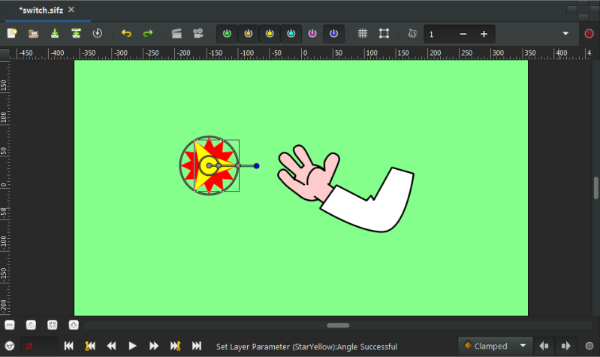
[switch.sifz](https://forums.synfig.org/uploads/default/original/2X/3/3fcb7688cc749e9d54920a926135893d208286b9.sifz) (14.4 KB)
---
### Author:  [@sarahah](https://forums.synfig.org/u/sarahah)
#### Post date: [September 14, 2017, 5:43am UTC](https://forums.synfig.org/t/basic-custom-switch-controller-tutorial/3435/2 "2017-09-14T05:43:51Z")
Hello hope you are doing well? I have a question that how to use a UI Presentation Controller for slick custom presentations? Any help would be appreciated.